Dynamic Linking
Linking Overview
In order to understand dynamic linking, we must first define linking. Linking is the process of joining together multiple object files, to create a shared library or an executable.

When one object file references functions or variables—which do not exist within the file’s context—but rather in other object files (dependencies), they must be linked. Linkers allow the use of separate, independent sources of code by providing a way to merge the code together into a single file, so the developer will be spared of this low-level detail.
For example:
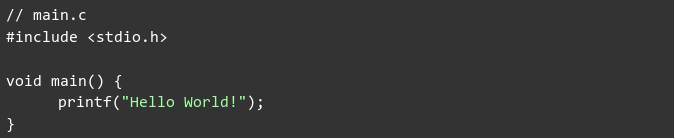
main.c does not implement the printf function, so in order to invoke
printf, main.o will have to be linked against printf.o (the
include <stdio.h> directive only imports the definition of printf—it does
not contain its implementation).
There are two linking types:
- Static linking: Completed at the end of the compilation process
- Dynamic linking: Completed at load time by the system
Static linking is fairly simple:
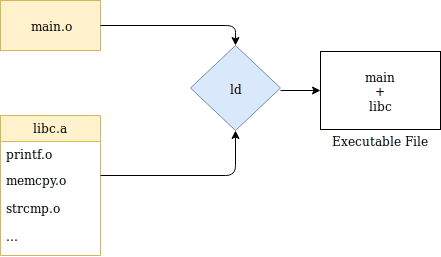
The compile-time linker (ld) collects all relevant object files—main.o and
the libc.a static library (a bundle of object-files)—applies relocations and
combines the files into a single binary. As such, when many object files are
linked, the resulting binary file size can become very large.
Dynamic linking, on the other hand, is a more complex process. Unlike in
static linking, ld requires shared libraries to create a dynamically linked
executable. The output file will contain the executable’s code and the names of
the shared libraries required, embedded within the binary:
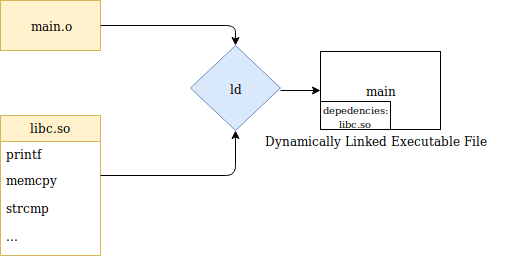
When the binary is executed, the dynamic linker will find the required dependencies to load and link them together. Thereby, deferring the linking stage from compile-time to run-time. We will detail how this process works shortly.
There are pros and cons to these two approaches:
- Static linking allows containing all dependencies in a single binary, making it more portable and simple to execute, at the expense of the file size.
- Dynamic linking allows the binary to be smaller, at the expense of having to ensure that the required dependencies exist in the target system that the binary will be executed in.
The Dynamic Linking Process
The dynamic linking process begins immediately after execution.
For statically linked programs, execution is straight forward. The system creates the memory layout from the file’s segments and passes control to the file’s entry point.
With dynamically linked programs, the system executes the file’s “interpreter”,
which is an intermediate program that should set up the environment and only
then execute the main binary. The interpreter lies in the PT_INTERP segment
created by the compile-time linker (ld). In this case, the interpreter is the
dynamic linker program ld-linux.so.2:

The dynamic linker will set up the environment using dynamic entries from the
.dynamic section:
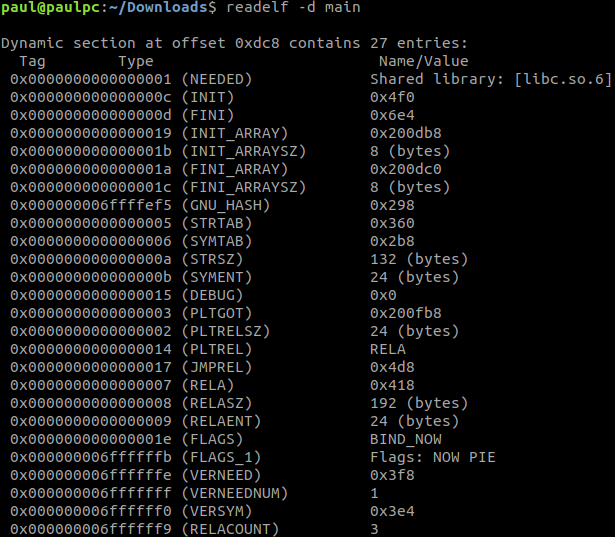
These entries are crucial to the dynamic linker, which include:
DT_NEEDED- the name of a required dependency to load.DT_SYMTAB- the address of the dynamic symbol table (covered in our previous blog post about symbols).DT_FLAGS- such as theBIND_NOWflag that instructs the dynamic linker to perform all linking before handing over control to the program.
When the binary is executed, the system loads the dynamic linker into memory and execution will be passed to the dynamic linker’s entry point. The dynamic linker begins preparing the environment as follows:
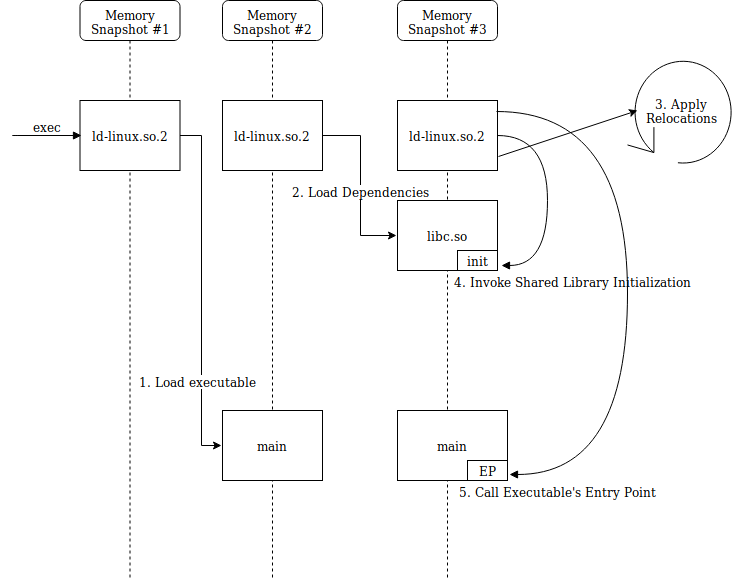
- Load the original file’s
PT_LOADsegments in memory. - Use the
.dynamicsection/segment to read dependencies, search for them on disk and load them in memory as well. This is done recursively for dependent libraries—they can be dynamically linked as well. The dependency searching algorithm is outlined in the ld.so man page. - Perform relocations - shared libraries are loaded into non-deterministic addresses and must have absolute addresses patched, as well as resolving references to other object files.
- Invoke shared library initialization functions (registered in the
.preinit_array,.init,.init_arraysections). - Finally, pass control back to the original binary’s entry point, making it
seem to the binary that control was passed directly from
exec.
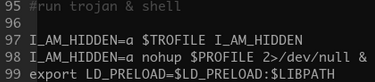
It is important to mention the LD_PRELOAD feature, which enables defined
libraries to precede the loading of other dependencies. This is useful for
overriding functions in other linked modules. This feature can be configured
via the LD_PRELOAD environment variable, or via the /etc/ld.so.preload
file.
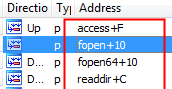
This feature is often abused by malware developers to hook known functions. Our recent HiddenWasp Linux-based malware discovery demonstrates such use:

Another interesting feature is LD_LIBRARY_PATH. This environment variable
holds the path to the first directory where dependencies will be searched for,
and is therefore abused by some malware developers as well.
Additional environment variables and configuration files that can alter the dynamic linker’s behavior do exist, and will be covered in the future dedicatedly.
Lazy Linking
We mentioned earlier that the dynamic linker performs all relocations before handing over control to the main binary, however, this is not always the case.
Let’s examine the following code example which will be dynamically compiled:
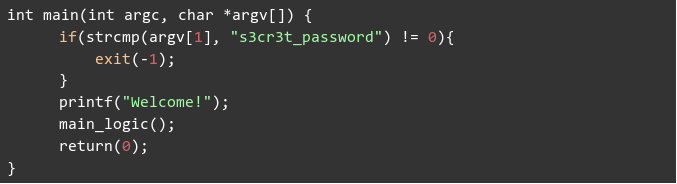
The program checks for the correct input in its command line
"s3cr3t_password". If the input matches, the program will begin executing its
main logic. If not, the program will immediately terminate.
If the program receives an incorrect input, it will terminate, rendering useless all of the relocation work performed by the dynamic linker. One can imagine how many relocations would be applied on a codebase with thousands of symbols. Precious time would be wasted by enforcing each and every symbol relocation.
Lazy linking is an optimization for this problem. Lazy linking instructs the dynamic linker to resolve function references when they are called (lazily) instead of at load-time (eagerly).
This is enabled by the Procedure Linkage Table (PLT) and the Global Offset Table (GOT).
The GOT holds entries of addresses of global variables and external functions.
The PLT consists of short entries of instructions (often called “trampolines” or “thunks”), used to reach external functions by redirecting control flow of execution to its corresponding GOT entry.
Generally speaking, in dynamically linked executables, external functions are reached by calling their respective PLT entry:

The PLT entry will retrieve the function’s address from the function’s GOT entry, and call it:

- With early binding, GOT entries are relocated by the dynamic linker at load-time.
- With lazy linking, the GOT entries will be relocated on-demand by a function call. At a function’s first invocation, the PLT will be used to call the dynamic linker to link the missing function.
We will compile the last example with lazy linking this time.

Now, we can see what happens when a function is called for the first time:
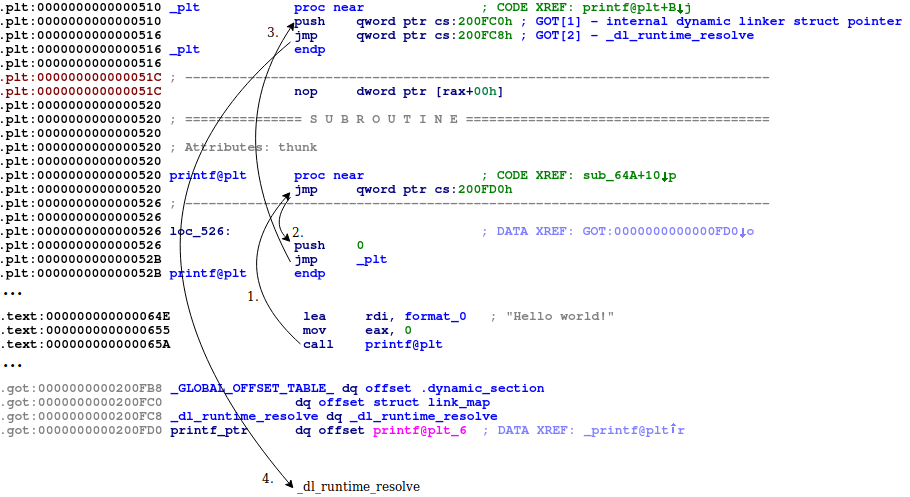
- The
printfPLT entry is called, the GOT entry is retrieved and jumped to. - At load-time, the dynamic linker fills every GOT entry with the address
pointing to the second instruction of the respective PLT entry. Therefore,
printf’s GOT entry will point back toprintf@plt+0x6. The dynamic linker needs to know which function needs to be relocated, so we push a number to the stack (I.E. 0): An index, which serves as the index of the relocation in the.rel.pltsection, is used to calculate the requested entry in the GOT (GOT[index+3]—the first three indexes are reserved to addresses related to the dynamic linker as seen in the illustration). - The first PLT entry (
PLT[0]) is called, whose purpose is to call the dynamic linker’s_dl_runtime_resolveto resolve the designated relocation. - Consequently, control will be passed to the dynamic linker. The dynamic
linker will relocate the
printfGOT entry to point to the correct address withinlibc.so, and finally pass control toprintf.
A resolved GOT entry:
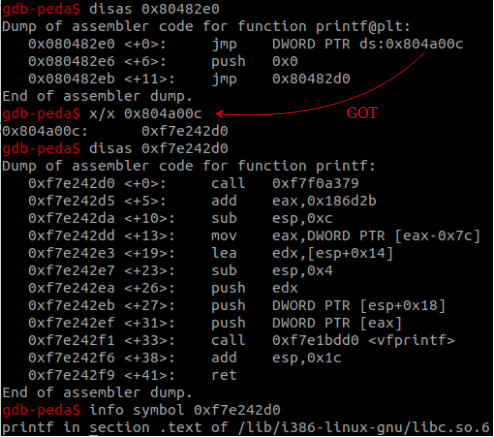
Future calls to printf@plt will retrieve printf’s resolved address residing
in the GOT and jump there immediately.
Summary
This post explained the differences between static and dynamic linking. Furthermore, the information presented the dynamic linking process, and its lazy linking feature.
It is interesting to see malware in the wild abusing dynamic linker features as it does require some degree of knowledge and sophistication.
We hope you enjoyed reading this series! If you have any questions, please feel free to contact us.
Here are some additional resources for further reading: